Telavox
Info
Telavox Touchpoint uses dstny's "Meridix" platform behind the scenes.
Features
- Trigger an NPS survey on SMS for Users (BcsUserId) and Queues (BcsQueue)
- Measure on OUTBOUND calls
- Measure INBOUND calls to both queues and users
- Attach agents to responses
- Set up minimum call duration
Requirements
You have a subscription to nps.today that includes SMS surveys
You are required to provide the following attributes from Telavox to setup the integration
- CollectionPointIdentifier
- CustomerId
- token
- secret
- list of Mesurement Object Identifiers queues/groups/users to trigger surveys from
Tip
You should contact your Telavox consultant for help with the above information, and assistance regarding your phone setup.
Setup
Getting your secret and token
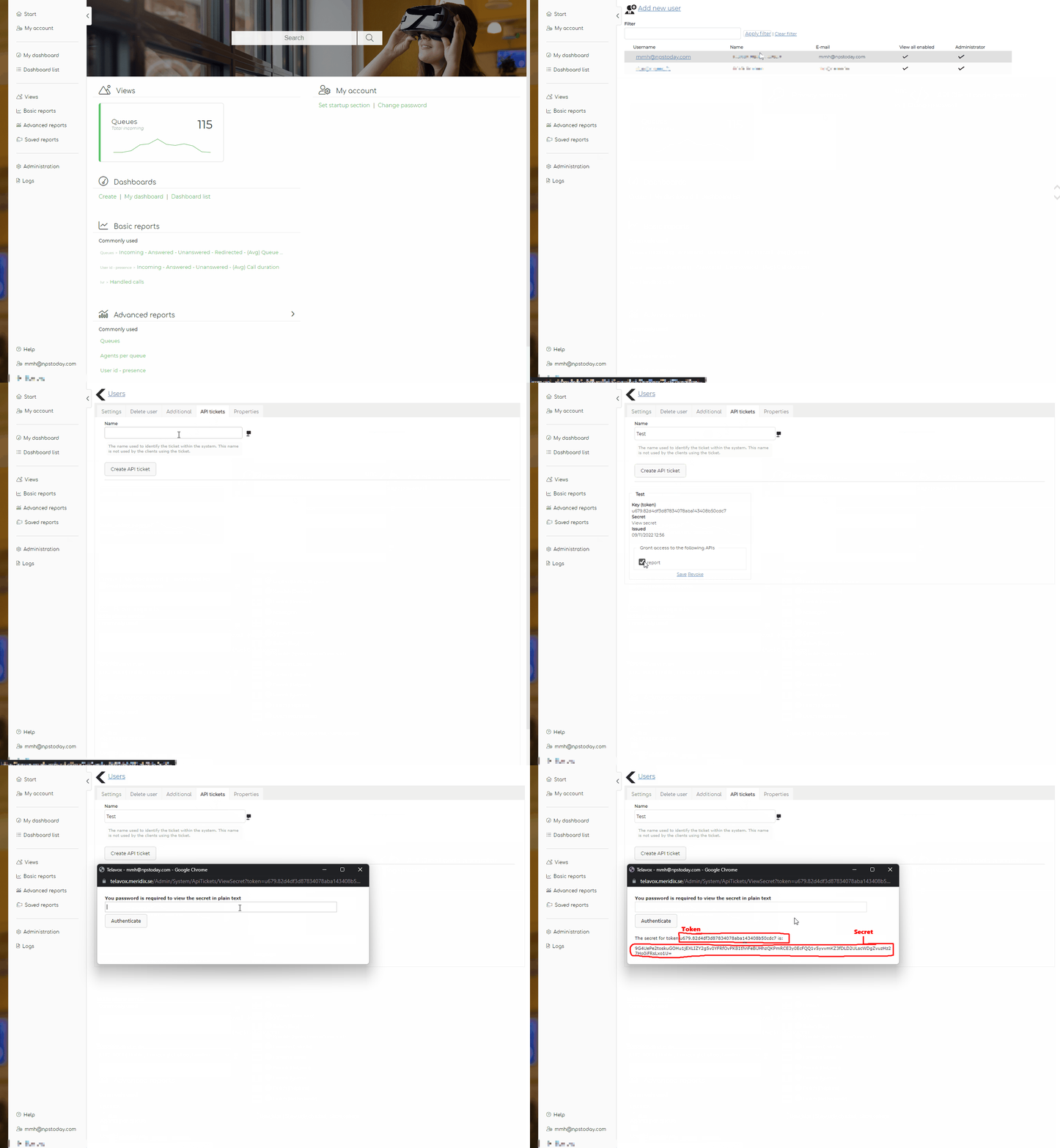
If the gif below does not play please follow these steps:
- Go to your meridix website telavox.meridix.se and login
- Go to Adminstration -> Users
- Click any admin user that will remain in the platform permanently
- Go to the "API Tickets" tab
- Enter a name and click "Create API Ticket"
- Check the "Report" checkbox in the card that appears below
- Click "View Secret" and enter your password again in the popup
- Copy your
secretandtoken
Finding the identifiers
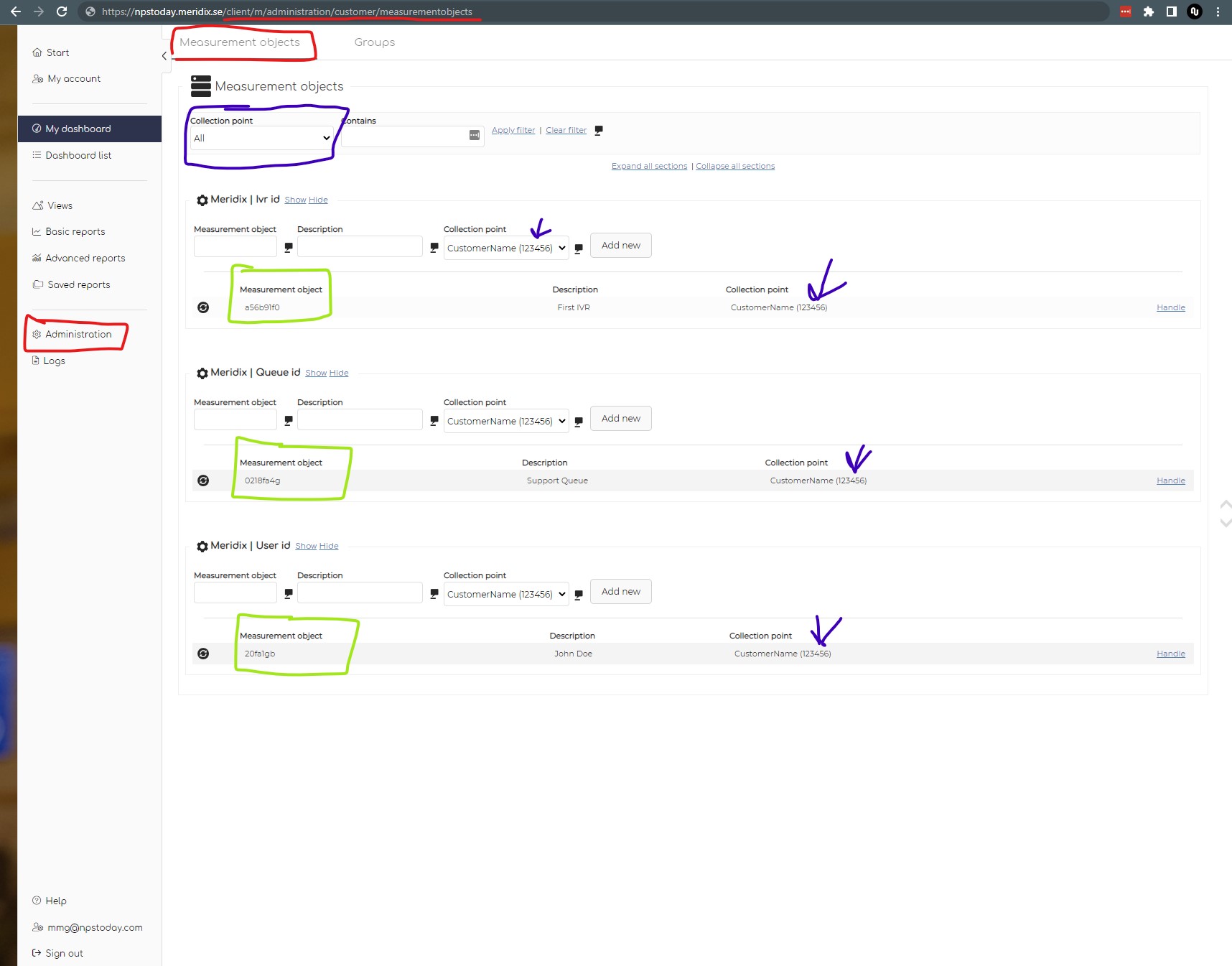
On the image below all all the data you need to setup your integration is highlighted in different colors
To find the location of the data displayed on the screenshot below. Login to your Meridix website at telavox.meridix.se, go to Adminstration -> Mesurement Objects
- Red is location hints to show where the screenshot is taken
- Green is your
Mesurement Object Identifiersthey define aqueue,User, orIVR. In the screenshot they appear as random letters and numbers ex.29fa1gbbut they may also appear at phone numbers depending on your configurations - Blue is your
Collection Point IdentifierYou may have multiple of these that you can choose in the dropdown, usually most accounts have just one. You need theIDof this, not the name.
Configuring nps.today
go to app.nps.today/home/ivr
Click "Add IVR" in the top right.
- Name: Give it a name.
- Campaign: Pick a campaign (Set the campaign to manual at first if you don’t want to trigger any surveys right away).
- IVR Provider: Choose
Telavoxin the IVR Provider dropdown. - Collection Point Identifier: Put in your
Collection Point Identifierfrom Telavox. - CustomerID: Put in your Customer ID from Telavox. If you don't know your
Customer IDenter a random number. - Module Name: Put in Telavox.
- Report Name: Select the report to collect data from. See more in the data section.
- Mesurement Object Identifiers: put in your
Mesurement Object Identifiersexcactly as it appears in Telavox. - Token: Put in your
tokenfrom Telavox. - Secret: Put in your
secretfrom Telavox. - Default Country: If you do not receive country code on your calls, you can add them here. If you are receiving call from Sweden with no county code add
SEin this field.
See what country codes we support here. - Test: When everything is filled click
testin the top right corner.
If you did not know your customer id, you should see a similar message to this:

Set your correctCustomer ID"5" and click test again.
Otherwise you should get a JSON formatted response with the calls nps.today can see with the given setup and the timeframe set in the test window.
If everything is correct, click "Save", and you are live!
Options
Ignore Transferred Out enabled
We recommend enabling this feature
Checking the Ignore Transferred Out box will ignore all calls that are marked as "Transfer" in the customMassage field ("customMessage": "Transfer"). This includes internal transfers between Queues, calls you transfer to phonenumbers outside your own phone setup, and redirections outside the original queue.
This means that the Agent ending the call will trigger a survey, as this is not a "Transfer".
Trigger on pickup
As standard the integration triggers surveys on calls of the type Answered by agent.
When enabling this feature surveys will also be triggered on calls of the type Answered by agent(pickup).
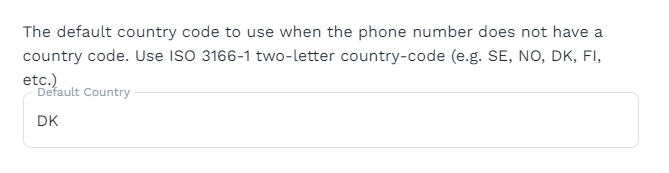
Add default country code
When sending out surveys nps.today needs a country code. Use this feature if our system does not provide us with a country code.
Use ISO 3166-1 two-letter country-code (e.g. SE, NO, DK, FI, etc.) in the text field.
Options when using the report TelavoxUser:
Enable inbound- and/or outbound calls
Trigger on outbound calls and/or Trigger on inbound calls must be enabled for the integration to send out surveys.
Trigger on outbound calls
When this is enabled, surveys will be triggered on outbound calls.
Trigger on inbound calls
When this is enabled, surveys will be triggered on inbound calls.
Data
When adding a respondent to nps.today we map certain data in the custom field on the respondent. The data stored is defined by the Report Name you choose when setting up the IVR mapping in nps.today.
Report names

Below you see payload examples of the data stored from the different reports:
Custom data stored from the TelavoxQueue report
"custom": {
    "specification": {
        "callId": "Some ID",
        "recordIdentifier": "Some ID",
        "type": "Answered by agent",
        "timestamp": "2023-12-06T12:01:27.103",
        "sourceId": "+4512345678",
        "queueName": "nps.today - Support",
        "answeredByAgentRecordIdentifier": "Some ID",
        "answeredByAgentId": "Some ID",
        "answeredByAgentName": "John Doe",
        "queueTime": 11,
        "duration": 232,
        "customMessage": ""
    },
    "callDuration": 232
  }
Custom data stored from the TelavoxUser report
{
"specification": {
    "callId": "Some ID",
    "recordIdentifier": "Some ID",
    "type": "Inc. answered",
    "timestamp": "2024-02-05T08:14:53.804",
    "sourceId": "+451235678",
    "distributedFromQueueId": "nps.today - Sales",
    "parentCallId": "Some ID",
    "userIdentifier": "a3b41234",
    "userId": "John Doe",
    "targetId": "",
    "targetIdType": "",
    "duration": 250,
    "customMessage": ""
},
"callDuration": 250
}
FAQ & Known issues
Survey delay
Surveys have a delay of up to 20 minutes after a call has ended due to delays in Meridix that we use to get call information, and our query interval towards Meridix of 10 minutes between each update.
Call statuses handled by the integration
In the calldata recieved from Meridex, nps.today recieves the field "Type" which identifies the calls status. The integration is set up to only trigger a survey on the following status:
- Indbound queue: "Answered by agent"
- Indbound user: "Inc. answered"
- Outbound user: "Out. Answered"
Redirected/Transferred calls
Due to the nature of Meridix being a statistical platform we do not always get the correct information about where a call has ended. A call may from your agents point of view be transferred to a colleague, but in the data we read from Meridix be listed as actually ended before it was transferred out. In in this case please manually reassign the employee you think is the correct responsible for the call in nps.today.
Warning: Multiple identical calls
Notice that by configuring survey triggers on both Queues and Users may cause the same call to be seen twice by our software. If you use our Throttling and/or Duplicate features we will only deliver and charge for one survey. However we do not see the calls in a fixed order so we can not distinguish between them which may result in a wrong employee being assigned as responsible to a survey, or a customer getting a wrong survey. Including the same agent twice and the effects of doing so is your own responsiblity.
Minimal callduration
Call duration filter can currently not be changed. Minimal call duration to qualify a call for a survey is fixed at 10 seconds.