Utilize your customer experience data
This page describes how you can fetch data from nps.today and use it to show customer experience data to the users of your own system, or to load it into a data warehouse.
What you'll find here
| Your goal | Use this |
|---|---|
| Show responses to agents inside another system's UI | NPS Feedback App |
| Pull responses ad hoc, across campaigns | The responses endpoint |
| Load all data into a data warehouse or BI tool | The /v2/bi/ endpoints |
| React to a new response as it arrives | Webhook subscriptions |
Parameters, payloads and limits for every endpoint on this page live in the API reference. This page covers which endpoint to use and how to build a reliable load, not the field-by-field specification.
NPS Feedback App
The Feedback App is built as an easy way for systems to visualize customer response data to their users. Not all systems have the functionality to use the Feedback App. In that case, go to Get data with our API.
For the technical documentation on the Feedback App, see Feedback App.
To see how it is used in practice, see our Dixa integration.
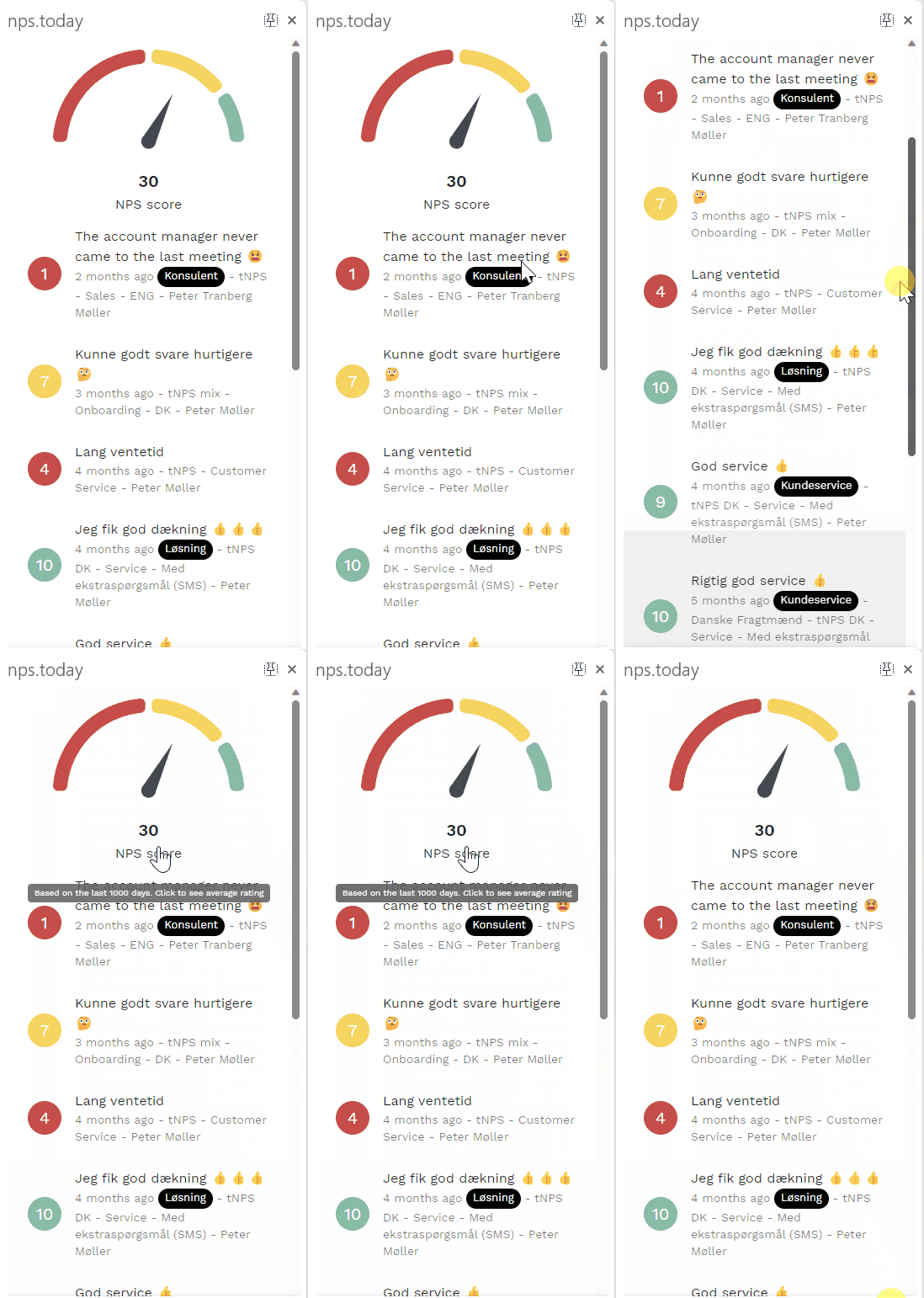
Below is an example of the Feedback App:
Get data with our API
By getting data back we mean a third-party system consuming data from nps.today and displaying it to its users. How complex that is depends on the functionality available in the receiving system.
Below is the flow from triggering a survey to retrieving the response back into the system:

For adding responses directly to another system, use
GET /campaigns/responses, which
returns responses across all campaigns:
https://api.nps.today/campaigns/responses
Use our /v2/bi/ endpoints
Many of our customers retrieve data into their own data warehouse and work with it from there. For
that, use a combination of the /v2/bi/ endpoints. They all
share the same paging and filtering pattern, so once you have built one, the rest follow.
| Endpoint | What it contains |
|---|---|
GET /v2/bi/responses |
The survey responses. Your fact table. |
GET /v2/bi/campaignmembers |
The campaign members added to a nps.today, including those who never answered. Holds respondent data and the custom data field. |
GET /v2/bi/campaigns |
Campaign definitions. |
GET /v2/bi/employees |
The responsible employee on a respondent or response. |
GET /v2/bi/companies |
The company dimension. |
GET /v2/bi/responsecategories |
The categorisation applied to responses. |
GET /v2/bi/emails and GET /v2/bi/sms |
Delivery level data per channel. |
Parameters and response schemas for all of them are in the BI section of the API reference.
A combination is often needed. The campaign member endpoint, for example, carries the custom data field that is typically used to map metadata onto a respondent when they are added to nps.today from an external system.
Limit on 300,000 records
There is a limit of 300,000 records per request. If the take parameter is bigger than the
maximum of 300,000 an error will be thrown.
Max 10,000 records at a time recommended
If you need more than 10,000 records we recommend you to use pagination. See Using skip and take for pagination.
Incremental loads
For a scheduled job you rarely want the full data set every run. All /v2/bi/ endpoints accept
modifiedAfter. /v2/bi/responses adds
ratedAfter, and /v2/bi/campaignmembers
adds firstSurveyExposure. All take an ISO 8601 date-time; see the API reference for the exact
behaviour of each.
https://api.nps.today/v2/bi/responses?take=10000&modifiedAfter=2026-01-01T00:00:00Z
The pattern we recommend is a full backfill once, then incremental on modifiedAfter for every
run after that. Store the timestamp of your last successful run and use it as the next
modifiedAfter value.
Timestamps are UTC
Timestamps in the payload are ISO 8601 in UTC. Convert to local time in your own system rather than assuming a timezone.
Retries
API access is rate limited per API key, and exceeding it returns 429 Too many requests. The current
limit is stated at the top of the API reference, and it can be tightened
dynamically under load, so treat a 429 as an expected response rather than an exception.
- Retry on
429and on5xxwith exponential backoff and jitter, capped at a few attempts. - Because one call can return a very large page, sequential paging on a single thread is usually enough and avoids the limit entirely.
- Fail the job on a non-
200rather than writing an empty page. Silently swallowed errors are the most common cause of "the data looks fine but rows are missing".
Unique identifiers
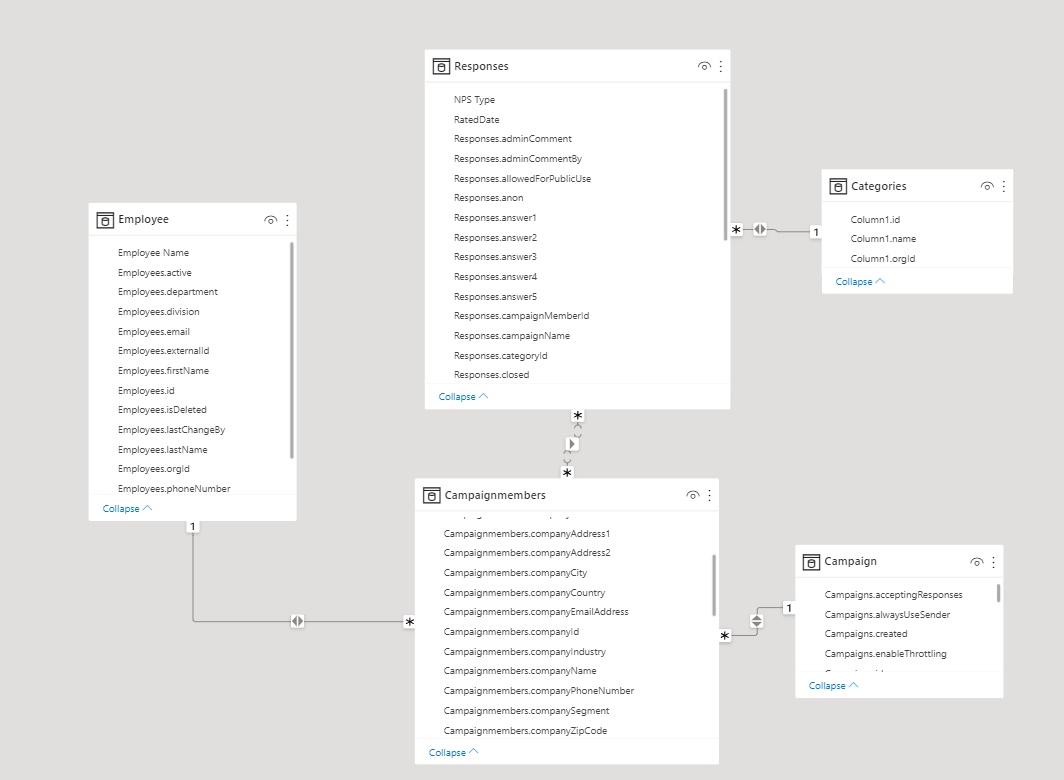
To combine data from the different /v2/bi/ endpoints, use these identifiers:
- campaignMemberId combines the campaign member and the response.
- employeeId combines the campaign member and the employee.
- campaignId combines the campaign member and the campaign.
- categoryId combines the response and the category.
Custom data
Custom fields come back in a custom property as JSON. What it contains depends on what the source
system sent when the respondent was added. See Data fields
for how fields are defined, and Custom data in Power BI
for working with it in a dashboard.
Parse custom as a string first
Depending on how the data was delivered, custom can arrive as JSON encoded inside a string
rather than as a nested object. Read it as a string and parse it, instead of assuming it expands
directly into an object. This is a common cause of failing transformations in Power BI and in
warehouse pipelines.
Advanced Survey Module answers
Surveys built with the Advanced Survey Module can
hold far more than a rating and a comment: single and multi select, per-question comments, and matrix
questions. Those answers are returned by both
GET /campaigns/responses and
GET /v2/bi/responses, in two shapes with
the same content:
surveyAnswersis an array, in the order the questions appear in the survey.surveyAnswersSimpleis an object keyed by the question name, for looking a question up directly.
Pick the one that fits your model and ignore the other. The array is usually easier if you are flattening to one row per answer; the keyed object is easier if you want a specific question.
Every entry carries name (the question key, and what you should join on), title (the question text
as the respondent saw it), value (the machine value, null when unanswered), displayValue (the
rendered string) and isNode. When isNode is true, the content sits in a data array underneath:
one child for an attached comment, one child per chosen option on a select question, and for a matrix
question one node per row containing one node per column.
Treat name as a constant
name can be edited in the campaign builder, but changing it is treated as a different question.
Responses collected before the change keep the old key and everything after uses the new one, so
the same question ends up split across two columns in your reporting and in any data warehouse
built on this data. There is no way to merge them afterwards without a manual mapping.
We strongly recommend deciding the naming up front and then treating name as a constant: fixed
for the life of the campaign, and the same structure across campaigns that ask the same questions.
If the wording of a question needs to change, edit title and leave name alone.
Don't assume a naming convention
The standard questions use fixed keys such as rating, disappointing_experience,
passive_experience and satisfied_experience. Everything else is named per campaign, so keys
can look like question_7 in one campaign and Question1 in another. Treat name as an opaque
key rather than something you can parse or sort on.
{
  "Question2": {
    "name": "Question2",
    "title": "How would you rate our service?",
    "value": 10,
    "displayValue": "10",
    "isNode": true,
    "data": [
      {
        "name": 0,
        "isComment": true, // (1)!
        "title": "Comment",
        "value": "-Comment",
        "displayValue": "My comment",
        "isNode": false
      }
    ]
  }
}
- A comment attached to a question arrives as a child with
isComment: true. On a matrix question, the column title spells out both the row and the column, so you can flatten it without reconstructing the grid.
Modelling this in a data warehouse
Land the answers as a map or a JSON string and flatten them in a separate step, rather than
mapping them to fixed columns. Unanswered questions are still present with value: null, so the
key set is predictable within a campaign, but it differs between campaigns and changes if someone
edits a name. A long table of one row per answer, keyed by response id and question name,
absorbs both without a schema change, where a wide table needs a new column every time. The
structure nests at most three levels deep.
Get responses with a webhook
To retrieve data from an nps.today account you can create a webhook subscription.
Here is an example on how a "create webhook subscription" could look like:
curl --location 'https://api.nps.today/webhooks/subscriptions' \
--data '{
    "action": "Create",
    "model": "Response",
    "url": "https://webhook.site/example-webhook-url",
    "filter": {
        "include": {
            "campaignId": 1234
        },
        "exclude": {
            "id": 1232345125
        }
    }
}'
"Create subscriptions" uses the following endpoint:
https://api.nps.today/webhooks/subscriptions
- action: this is the database operation
- model: this is the database entity
- url: a POST request is sent to this URL
- filter: the purpose of filter is to include or exclude certain webhook calls when a database operation has occurred
- include: decides what criteria you want to INCLUDE in your webhook subscription
- exclude: decides what criteria you want to EXCLUDE in your webhook subscription
Above subscription example listens to created responses on a campaign with the ID "1234" and excludes responses with responseID "1232345125".
After creating the webhook subscription, these conditions will trigger webhook calls from that point on. Every time these conditions are fulfilled, a POST request will be sent to the URL given. In above example the URL is "https://webhook.site/example-webhook-url".
For more information on how to create a webhook subscription click here.
For more information on other webhook endpoints click here.
Data by campaign
In your nps.today campaign builder you can use webhooks to listen to specific campaigns.
If your system does not provide you with an API you can retrieve responses with a webhook in nps.today. Please read the this guide.
Using skip and take for pagination
AI created content
This section was mainly created by an AI, and edidted by nps.today.
To pull a large amount of data, page through it rather than requesting everything at once. take is
the number of records to return and is required on the /v2/bi/ endpoints; skip is the number to
skip first and is optional. Start at skip=0 and increase skip by take on each following request:
https://api.nps.today/v2/bi/responses?skip=0&take=10000
https://api.nps.today/v2/bi/responses?skip=10000&take=10000
The records are not returned as a bare array. They come in a wrapper that also tells you where you are in the result set:
{
  "total": 259,   // (1)!
  "skip": 0,
  "take": 1,
  "results": [ ]   // (2)!
}
- The total number of records matching your query, not the number in this page.
- The records themselves.
Keep going until you have collected total records, or until a request returns fewer records than
the take you asked for. Checking both is worth it: total can shift underneath you if new
responses arrive while the job is running.
Example: fetch everything in blocks
Doing this by hand quickly becomes tedious, so it is normally written once as a small function that your job calls whenever it needs the data. The example below is that function.
What you give it: the API base URL and your authentication headers. What you get back: one list containing every response, already assembled from all the pages.
You do not need to know how many records exist, or how many requests it will take. The function works that out as it goes. It also deals with the two things that most often break an unattended job: being told to slow down, and a request that genuinely fails. The first means wait and try the same block again. The second means stop, rather than quietly handing back half the data as if it were complete.
In plain terms, the loop does this:
- Ask for the first block. Records 1 to 10,000.
- Handle a busy API. If nps.today replies that you are asking too quickly (
429), or something goes wrong on our side (a5xx), wait a couple of seconds and ask for the same block again. - Stop on a real error. Any other failure ends the job and reports what went wrong.
- Collect and move on. Add this block's records to the pile, move the starting point 10,000 forward, and ask for the next block.
- Know when to stop. When a block comes back with fewer records than asked for, or the pile has
reached the
totalthe API reported, everything has been collected.
The example is JavaScript, but nothing about it is specific to that language. The same five steps translate directly to Python, C# or whatever your pipeline is written in.
async function fetchAllResponses(apiBase, headers) {
    const take = 10000;   // (1)!
    let skip = 0;
    const all = [];

    while (true) {
        const res = await fetch(`${apiBase}/v2/bi/responses?skip=${skip}&take=${take}`, { headers });

        if (res.status === 429 || res.status >= 500) {   // (2)!
            await new Promise(r => setTimeout(r, 2000 + Math.random() * 1000));
            continue;
        }
        if (!res.ok) throw new Error(`Request failed: ${res.status}`);

        const page = await res.json();
        all.push(...page.results);

        if (page.results.length < take || all.length >= page.total) break;
        skip += take;
    }

    return all;
}
- The block size. Change this one value to page in larger or smaller blocks.
- This example retries forever. In production, use exponential backoff with a cap on the number of attempts, so a prolonged outage fails the job instead of hanging it.
Verify your setup
Before you schedule the job, confirm the basics with a few small requests:
- Call
GET /v2/bi/responseswith?take=1and check that you get200 OKwith one record. - Call it again with
skip=1&take=1and confirm you get a different record. - Add
modifiedAfterwith a recent timestamp and confirm the result set shrinks.
If all three behave as expected, your paging and incremental logic is sound.
Need help? Contact us at [email protected].