Puzzel
Our integration for Puzzel enables you to manage your customer satisfaction and work with P-GAP, without ever leaving your Puzzel platform. Below is a complete guide on how to implement the solution:
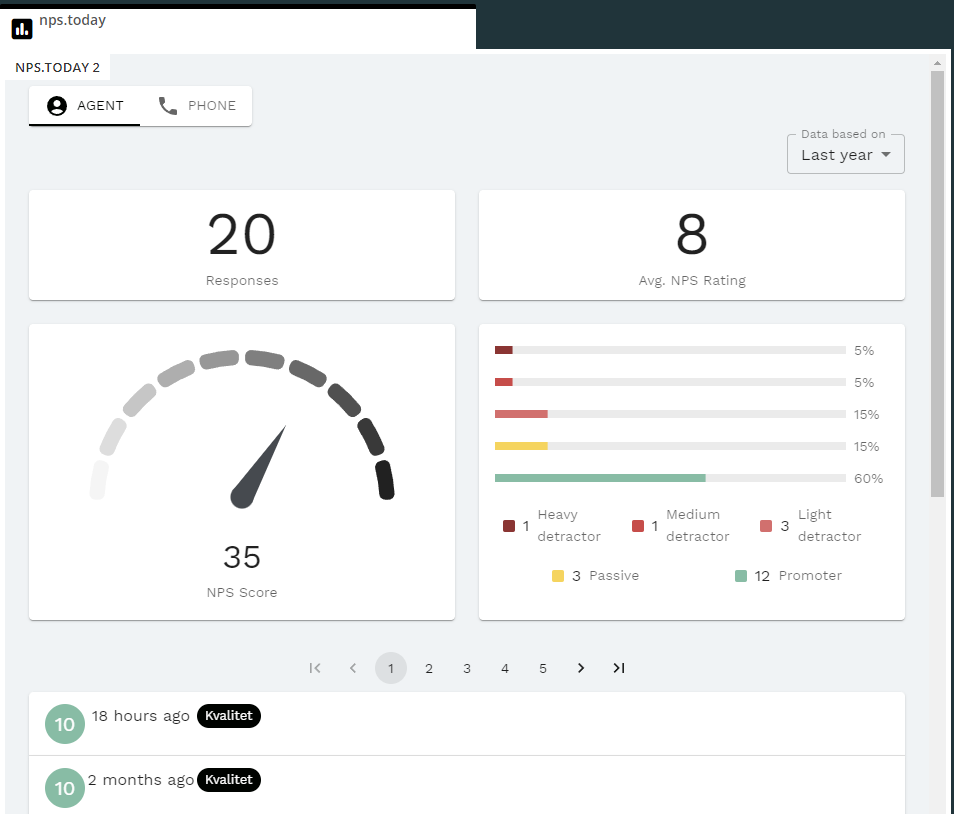 Puzzel showcase
Prerequisites
- You should be able to access the Puzzel admin portal
- You should be able to access app.nps.today
- If you are intending on testing P-GAP, you should also have access to add a P-GAP period on app.nps.today
Admin set up
-
Go to Puzzel admin portal
-
Navigate to Widget Configuration
- Url should be "
https://puzzel.nps.today" for production - APIkey is your api key from app.nps.today
- Url should be "
-
Navigate to Tab Configuration and add a new tab
- Call it "nps.today", and click Save changes
- Click the newly created tab, and click Insert a widget
- Find "nps.today" and click Add widget and then Save changes
-
Go to Tap Settings to set-up your tab
- Enable "Tab is always open" and set it to on
- Enable "Default opened in left tab-set" and set it to on
- In the Header section you can give you tab a name and change the color to make it fit your Puzzel UI.
- Click Confirm
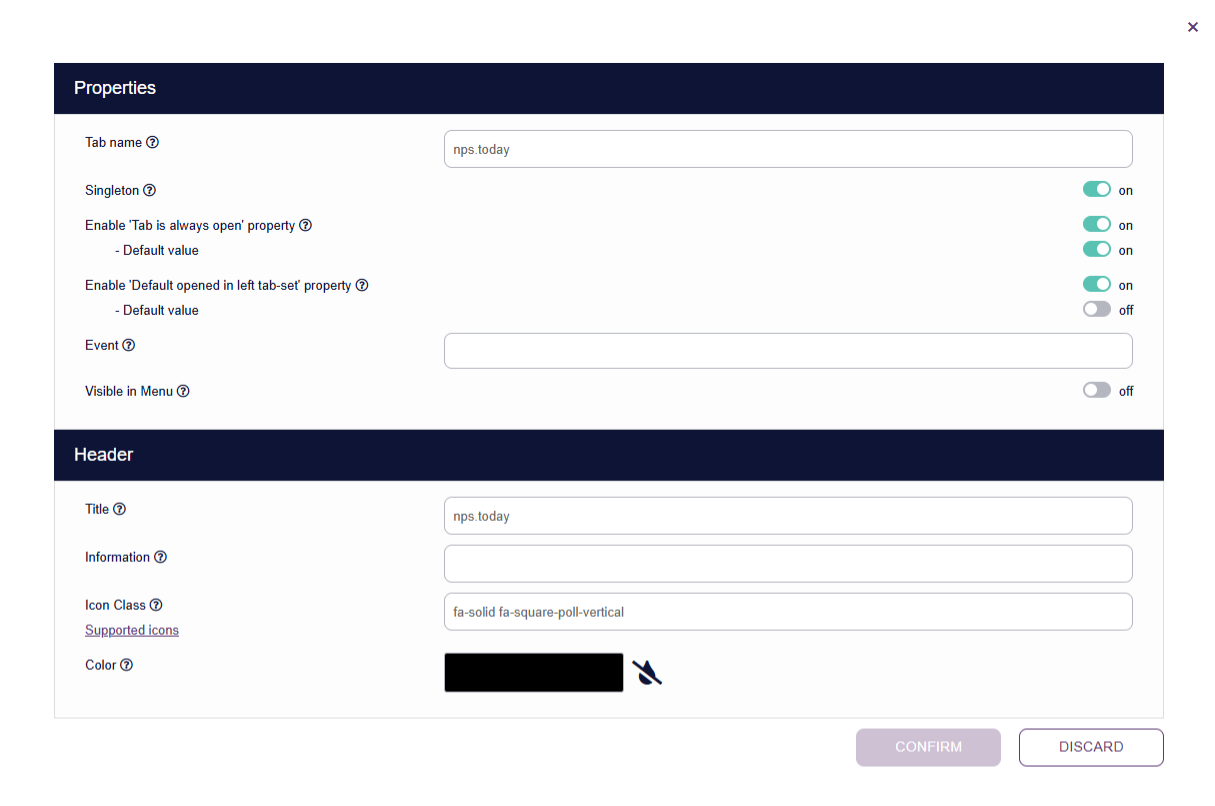
Default opened in left tab-set
We recommend having the nps.today tab popping up on the left side of the screen as a new call pops up on the right side.
In this way, you make sure the agent does not miss any calls because of the widget blocking the call tab. -
Click Save
-
Navigate back to Tab Configuration
- If the entire company should use the widget
- Click ☑️ at "nps.today" under Company/Inherit
- Set the value to on
- If only a user group should use the widget
- Click ☑️ at "nps.today" under Selected User Group/Inherit
- Set the value to on
- If only a user should use the widget (e.g. for testing)
- Select the User Group the user is in
- Click ☑️ at "nps.today" under Selected User/Inherit
- Set the value to on
- If the entire company should use the widget
-
Navigate to Widget Administration and find your nps.today widget
- Make sure that
canGetAccessTokenhas a ☑️ in the Default Value and a ☑️ in Possible to set option from widget
- Click Update
- Make sure that
-
The widget should now pop up next time an agent logs in at agent.puzzel.com. 🎉
Adding link between campaigns and Puzzel queues
If you want to send out surveys when the call has ended, you need to make a link between your campaign(s) and queue(s) in Puzzel.
- Go to the Puzzel admin portal and find the queue keys needed, or go to developer.puzzel.com and call the endpoint to get a list of all your queues.
- Now go to the IVR section on app.nps.today, and click Add IVR, follow the guide to add the link.
- Confirm everything is working as planned by going to agent.puzzel.com and making a test call.
Adding P-GAP period
In order to test P-GAP period, the agent should be registered in app.nps.today. The first time the widget is used for sending out a survey, the agent will be created automatically.
- Navigate to the P-GAP section on app.nps.today
- Click Add training session and go through the guide, making sure the start and end date are set, so that today's date are included, and the correct campaign(s) are selected.
- Go to agent.puzzel.com and make a test call, to ensure that you get prompted with a P-GAP pop-up, when the call has ended.
By default, the call should be above 60 seconds in order to trigger a survey/P-GAP, this can be changed by contacting our support.
P-GAP for extra questions
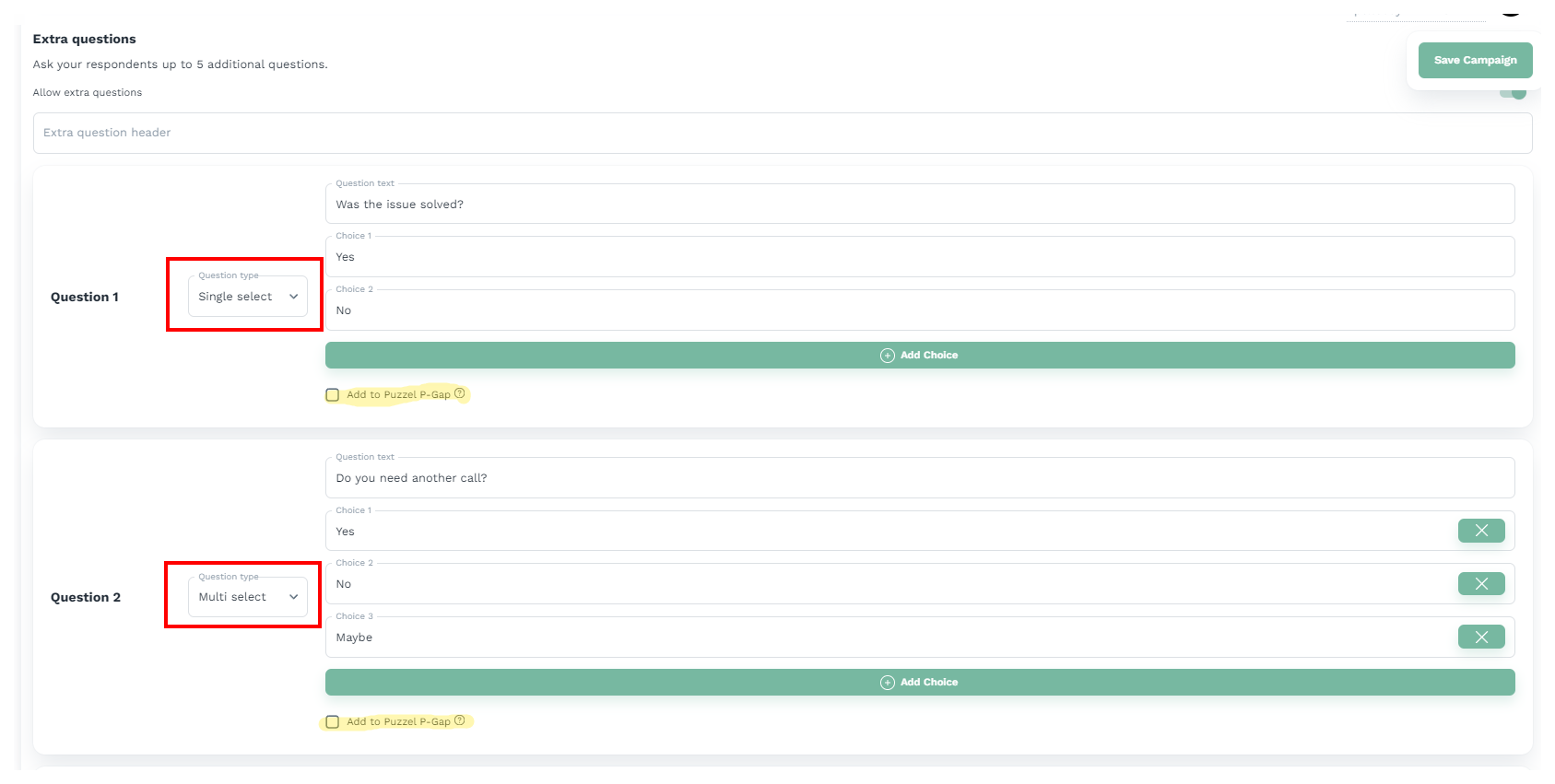
This feature enables you to use P-GAP on your extra questions related to a campaign in nps.today.
You activate this feature in your campaign editor in nps.today and allows prompting of the question to the Puzzel agent.
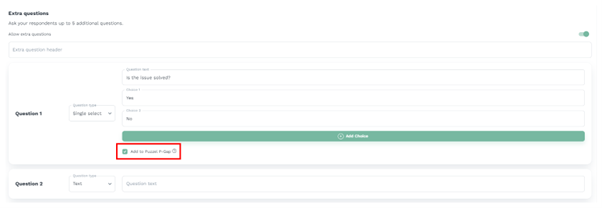
Use case
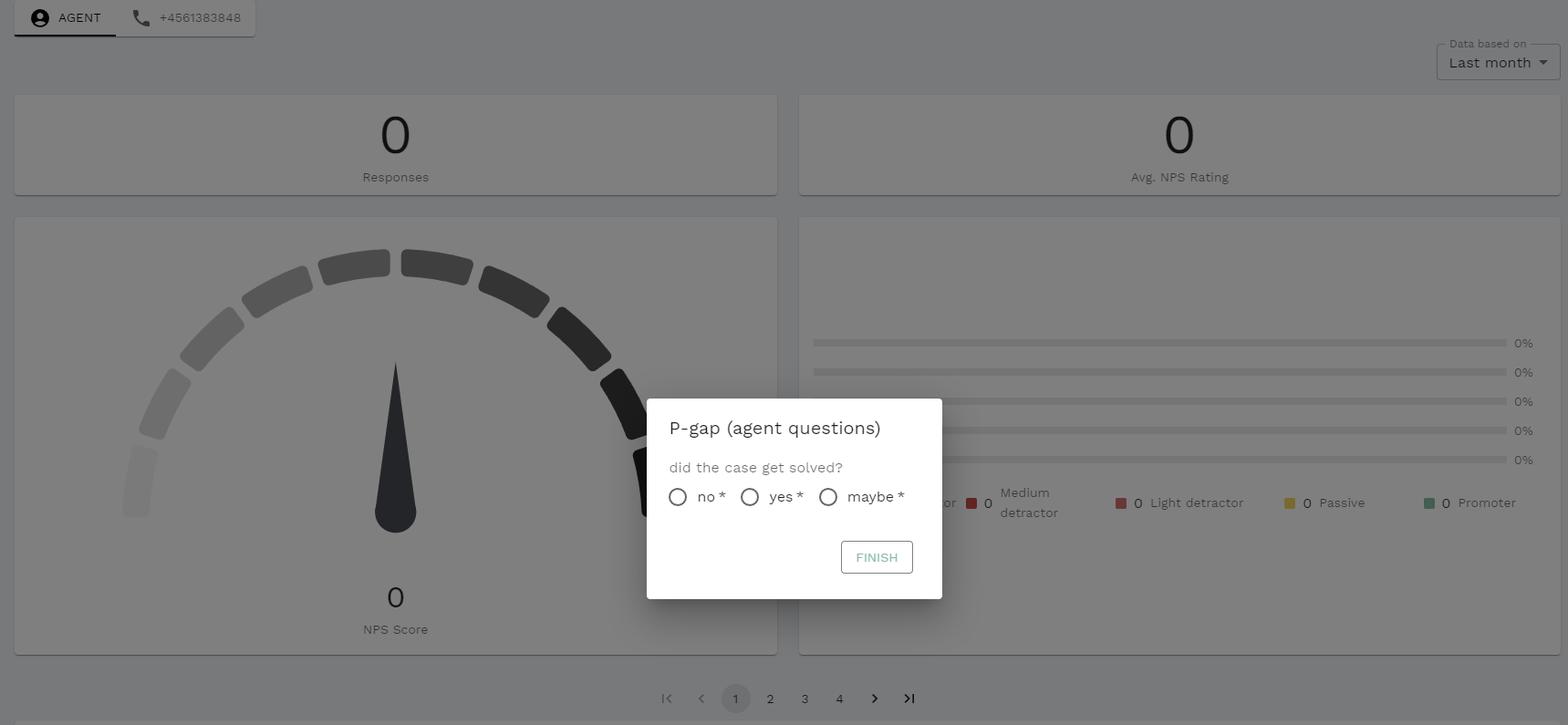
A highly relevant use case for this feature is FTR (First Time Resolution). With FTR both the agent and the caller will be asked if the problem was solved to see if they have the same perception of the resolution.
Below you see how the agent will get promted by the question in Puzzel.
Only works for single- and multi select
This feature is only available on extra question using single- and multi select.
Have the right licenses
This feature is only available if your subscription includes the P-GAP- and Puzzel module.
Hiding the Puzzel Widget
If you desire not to see the visuals of the widget you have the option to hide it. In the admin portal, do the following:
- Go to Widget Administration.
- In the NPS.Today Widget, click "Add widget property"
- Call it "hideWidget" with type "Boolean". We recommend having it set to false as default so that it's not toggled on after you have clicked Add widget propety.
- Once the propety is added, go to Widget Configuration and find the NPS.Today widget.
- Here you have the option to hide the widget. Set it at the appropiate level, fx. by Company.

Puzzel chat configuration
The widget also supports Puzzel chat, and can be used to send out surveys after a chat has ended.
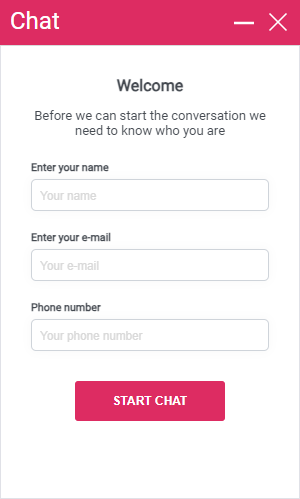
The chat currently only supports phone numbers as input for the chat
If you want to use the chat, you need to add a variable to the chat, which will be used to identify the customer. The phone number is treated as a danish phone number if no country code is added.
First find the variable, go to the Chat Service Configurations in Puzzel, and find the variable name in the chat configuration used.

Go to Widget ➡ Widget Configuration, unfold the nps.today widget, in the field "chatVariable" you can add the variable name for the chat.

You cannot use system variables in the chat configuration
The reason for this is that the system variables are not available in our widget. Although you can use the following system variables in other contexts, they will not work within our widget:
enteredFormName enteredChatId enteredFormIssue selectedQueueKey timeId2Map.
In this example the chat is setup to use the value from the variable phoneNumber, as a recipient for the survey. Read more about setting up sms delivery here
Call Flow set-up
Inbound calls
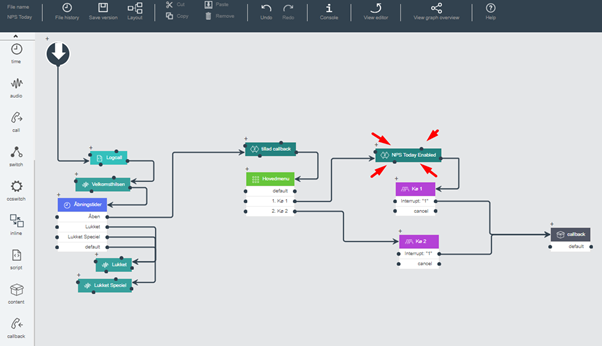
Create a 'control' variable
A ‘control’ variable is a mechanism to control whether a web request is sent toward nps.today
This means a request is sent only if the value of npstoday_enabled = true
This variable can be assigned value at various points in the Call Flow, giving you the ability to control which queues have it enabled.
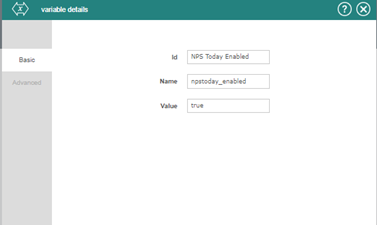
If you want it enabled for all queues, just assign as the first module in the Call Flow.
NPS Enabled for all queues
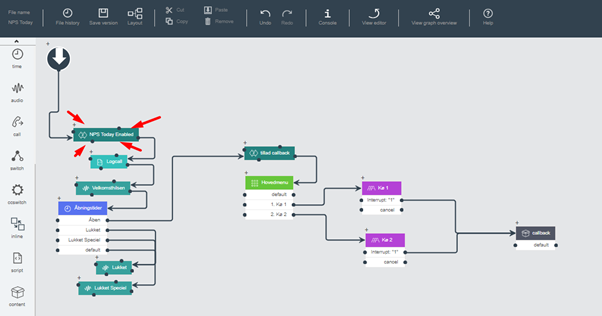
If you, for example, want to only enable for a single queue, you assign it before the preferred queue instead.
NPS Enabled for a single queue
Changes to 'final' script
CFT user with scripting access
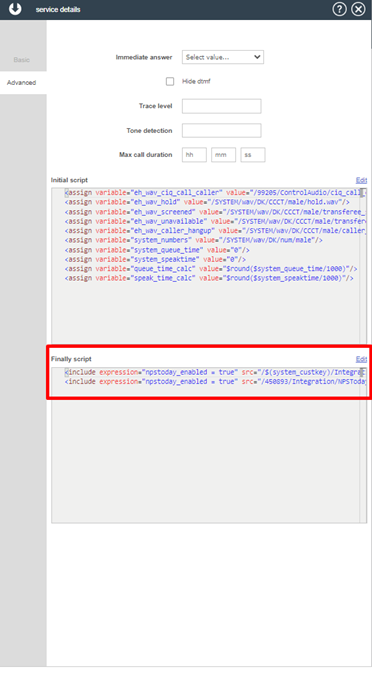
For making changes to the 'final' script you need to be a CFT user with scripting access.
If you are not able to make changes to the final script, please reach to your Puzzel partner/supplier for help.
Below script needs to be added to the ‘finally’ section of the Call Flow.
<include expression="npstoday_enabled = true" src="/$(system_custkey)/Integration/puzzel_auth.xml"/>
<include expression="npstoday_enabled = true" src="/450893/Integration/NPSToday_CallEnded.xml"/>
Steps to take if a new queue is created
If you have the NPS web request enabled globally, you do not need to do anything to include a new queue into this process. If you target individual queues via the npstoday_enabled variable, you only need to assign it to the new queue.
Outbound calls
To ensure nps.today surveys are triggered on outbound calls, the setup must be handled via Puzzel's Initial Script rather than the standard Call Flow Canvas. This requires a coordinated effort between your team and Puzzel Support.
What to do:
- Request a Change: Contact Puzzel Support with a "Change Request" to enable nps.today surveys to trigger on outbound traffic.
- Script Configuration: Instruct Puzzel to mirror the variables from your inbound flow into the Initial Script.
- Provide Guidance: If needed, you can share the Call Flow set-up guide for inbound with Puzzel Support for better understanding of what needs to be done.
- Link the IVR: Once the script is confirmed, you must configure the IVR for your outbound queue to point toward your nps.today campaign.
Change Request template
Dear Puzzel Support,
We would like to request a technical configuration change to our Puzzel environment to enable nps.today survey triggers for our outbound call traffic.
Currently, our nps.today integration is functional for inbound calls via the Call Flow Canvas. However, we understand that for outbound calls, the variables must be mirrored within the Initial Script to ensure the survey is triggered correctly upon call termination.
Request Details:
Objective: Trigger nps.today surveys on outbound calls in Puzzel.
Technical Requirement: Mirror the nps.today variables currently used in our "Inbound Call Flow Canvas" into our "Initial Script".
Reference: Please refer to the official nps.today Call Flow set-up guide for the specific scripting requirements.
Once these variables have been successfully added to the Initial Script, please let us know so that we can complete the final step of setting up the connection for our outbound queue to point toward our nps.today campaign.
Thank you for your assistance.
FAQ
Settings have not applied
Be sure to reload the Puzzel pages when making a change on app.nps.today. This is due to the settings getting synced when reloading the page.