nps.today for Zendesk
This integration lets you handle your customer satisfaction and loyalty across service and sales, without manual processes, without switching between systems, and without a large IT project. Setup automated satisfaction and loyalty surveys, get an overview of your costumers’ experiences, take actions based on the customers ratings and feedback, and improve customer loyalty.
Features
- View feedback history from requester on Zendesk tickets
- Use Zendesk triggers and automations to create survey logic
- Gather feedback after end messaging session
- Embed surveys directly into Zendesk emails
- Trigger SMS surveys after customer actions and conversations
Prerequisites
- Have an nps.today subscription
- Have a Zendesk subscription
- Login with as an Administrator in Zendesk
- Login with as an Administrator in nps.today
Installing
When installing your nps.today integration for Zendesk you need to find the App on their marketplace.
If the integration is bought via nps.today you will need a coupon code from nps.today by writing an email request to [email protected].
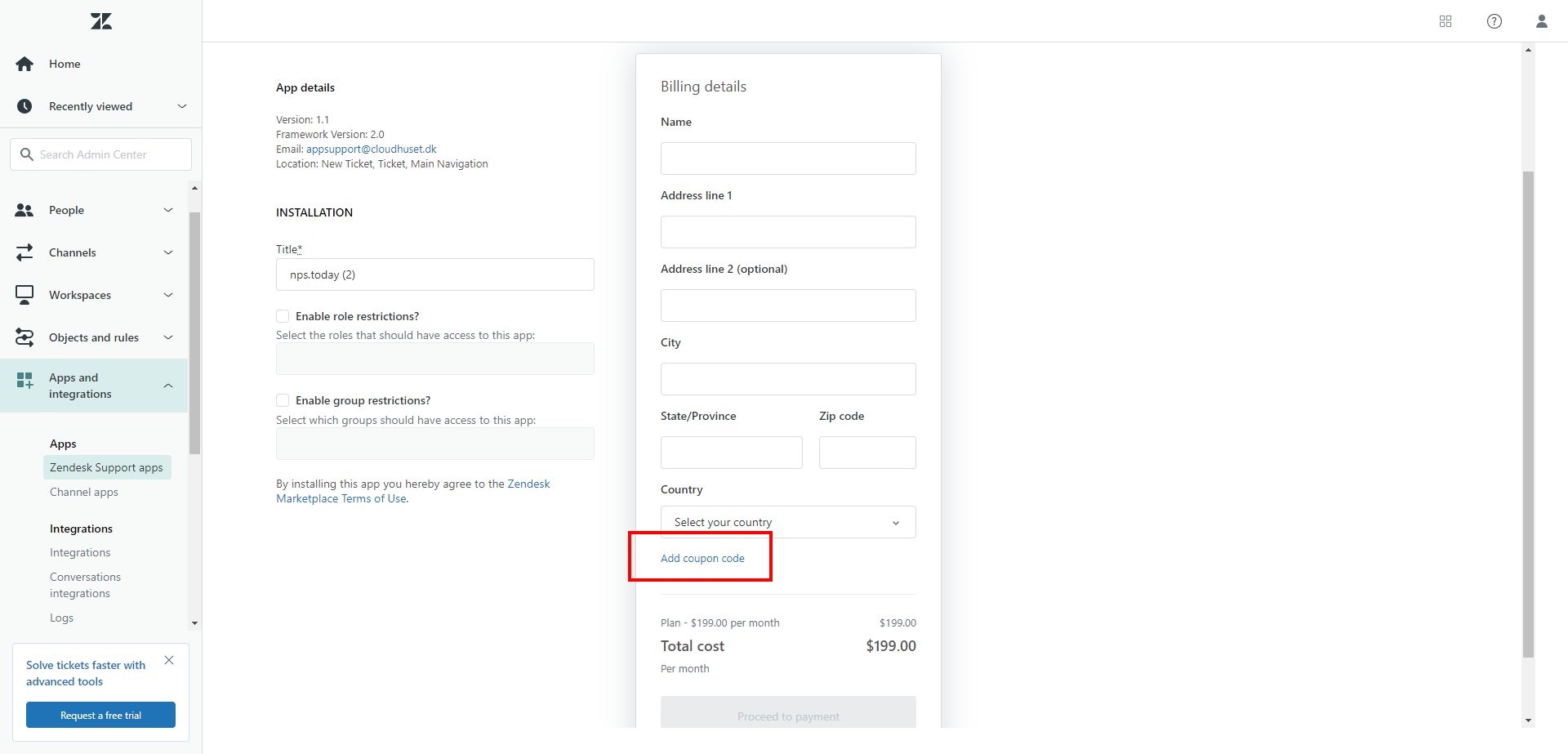
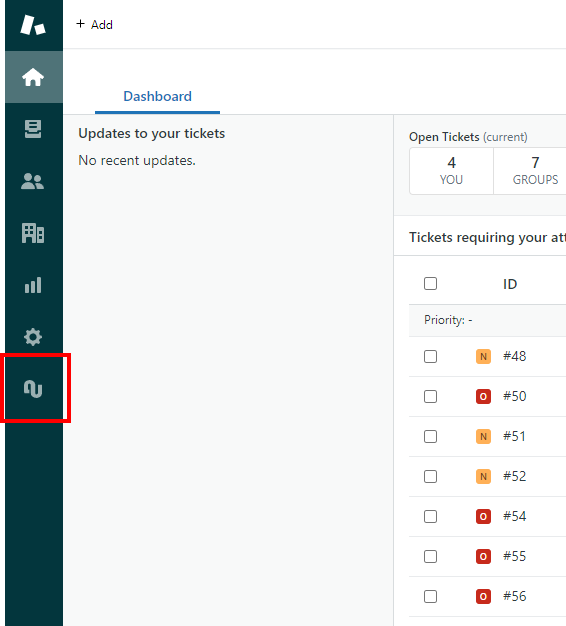
When the App is installed the nps.today logo will be visible on your panel on the left side.
Ticket fields
The integration will add three ticket fields to your account:

- nps.today agent rating: This field is for the agent to put in an agent rating if P-GAP is used. Read more about P-GAP here.
- nps.today campaign ID: This field is populated with a campaign ID from nps.today. This ID is necessary for sending out the right surveys. Read more about this later in this documentation.
- nps.today GUID: The field is populated with a unique identifier when a ticket is created. This GUID is used in the survey to send our personal/unique surveys.
It is of course up to you if the fields should be visible on the ticket or not.
View customer feedback
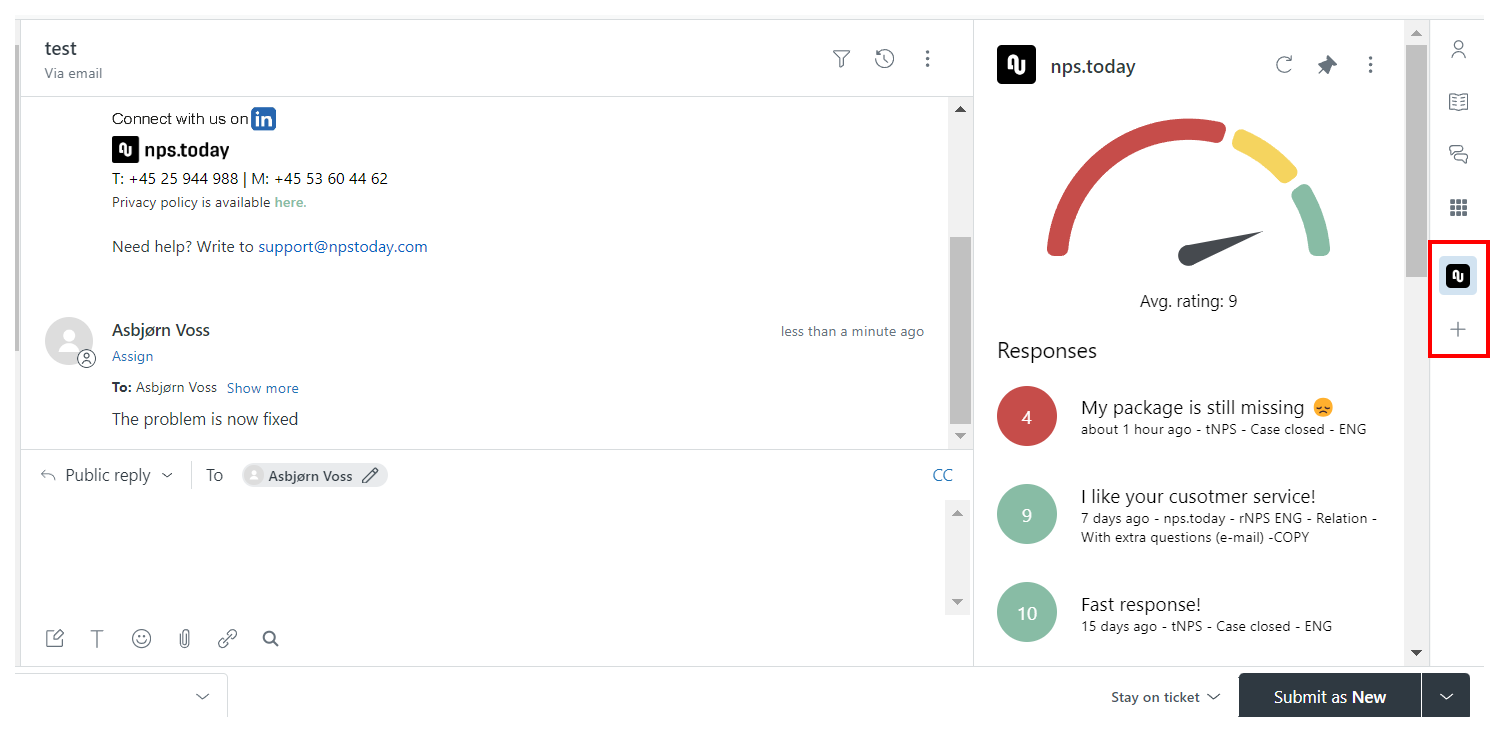
The integration gives you an overview of your costumers’ experiences with our feedback widget. This will show all responses available across all campaigns in nps.today with the same email address or phone number as the requester on the ticket.
To enable this on a ticket click the nps.today icon on the left side. If the icon is not visible click the "+" icon.
Setup
Set up your nps.today application in Zendesk by clicking the nps.today logo in your panel.
1. Authenticate
In section 1 "Authenticate with NPS.today" you need to write your API key from nps.today and click Update.

2. Link tickets to a campaign
Section "2. Triggers for linking your tickets to nps.today campaigns" lets you set up Zendesk triggers connecting the ticket to a campaign in nps.today.
Start by clicking "Create new trigger".
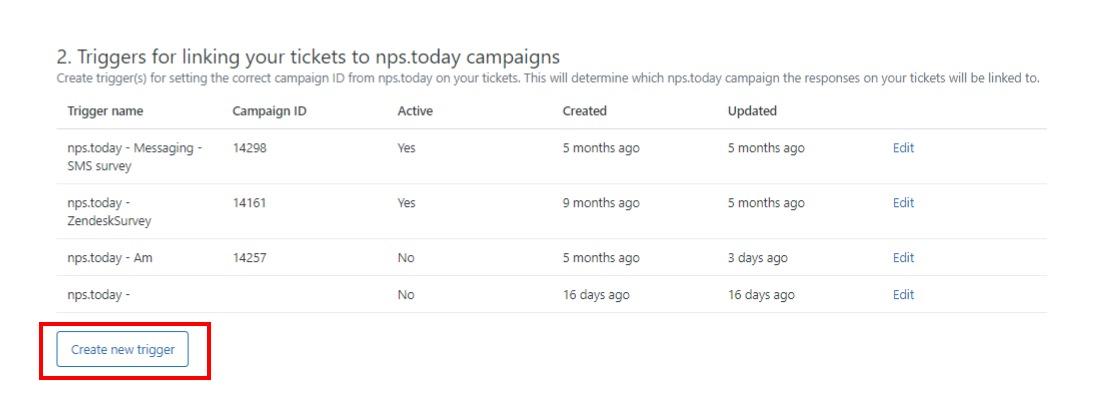
Put in a trigger name and the campaignID from nps.today.
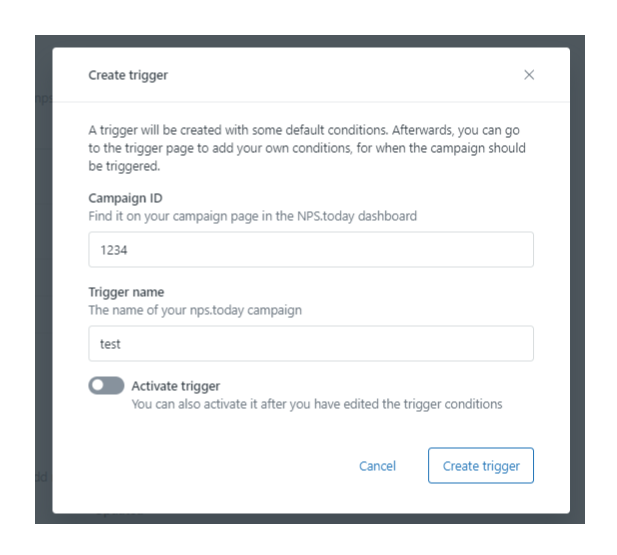
Edit the trigger if you like to add additional logic to it.
We recommend that you add a minimum of logic to the trigger before you have tested that the trigger works as intended.
Example of a trigger adding a campaignID the tickets
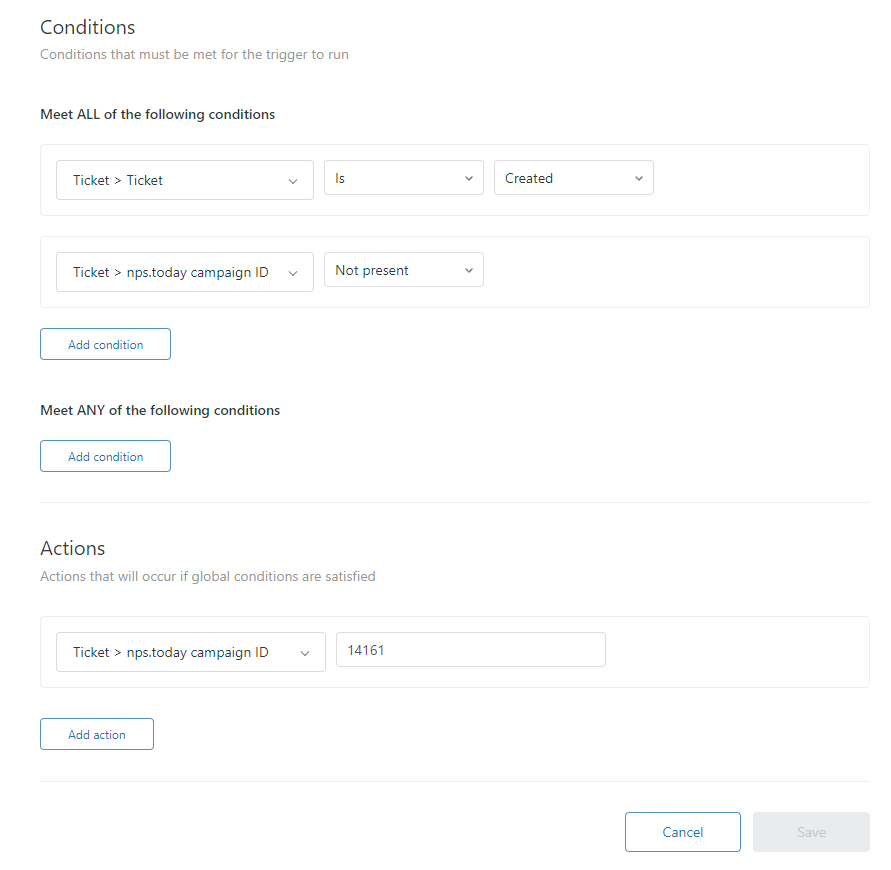
3. Trigger survey
In the section 3. Triggers/automations for creating respondents in nps.today are triggers that will add a respondent to nps.today and trigger a survey.
Start by clicking "Create new trigger/automation".
Select "Trigger" for sending out surveys.
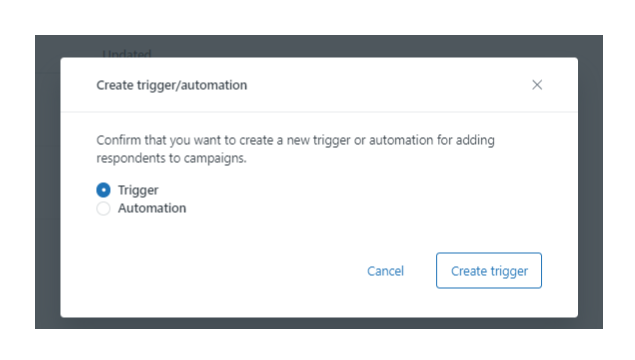
Edit the trigger if you like to add additional logic to it.
We recommend that you add a minimum of logic to the trigger before you have tested that the trigger works as intended.
Below is an example of the JSON body in the trigger:
Example of the JSON body
    {
    "respondent": {
        "emailAddress": "{% if ticket.requester.email %}{{ticket.requester.email}}{% else %}zendesk_{{ticket.ticket_field_24126772879377}}@npstoday.com{% endif %}",
        "firstName": "{{ticket.requester.first_name}}",
        "lastName": "{{ticket.requester.last_name}}",
        "phoneNumber": "{{ticket.requester.phone}}",
        "externalId": "{{ticket.requester.id}}"
    },
    "employee": {
                "email": "{{ticket.assignee.email}}",
                "firstName": "{{ticket.assignee.first_name}}",
                "lastName": "{{ticket.assignee.last_name}}"
                },
    "guid": "{{ticket.ticket_field_14902864284305}}",
    "custom": {
        "ticketId": "{{ticket.id}}"
    }
    }
Example of a trigger sending a survey
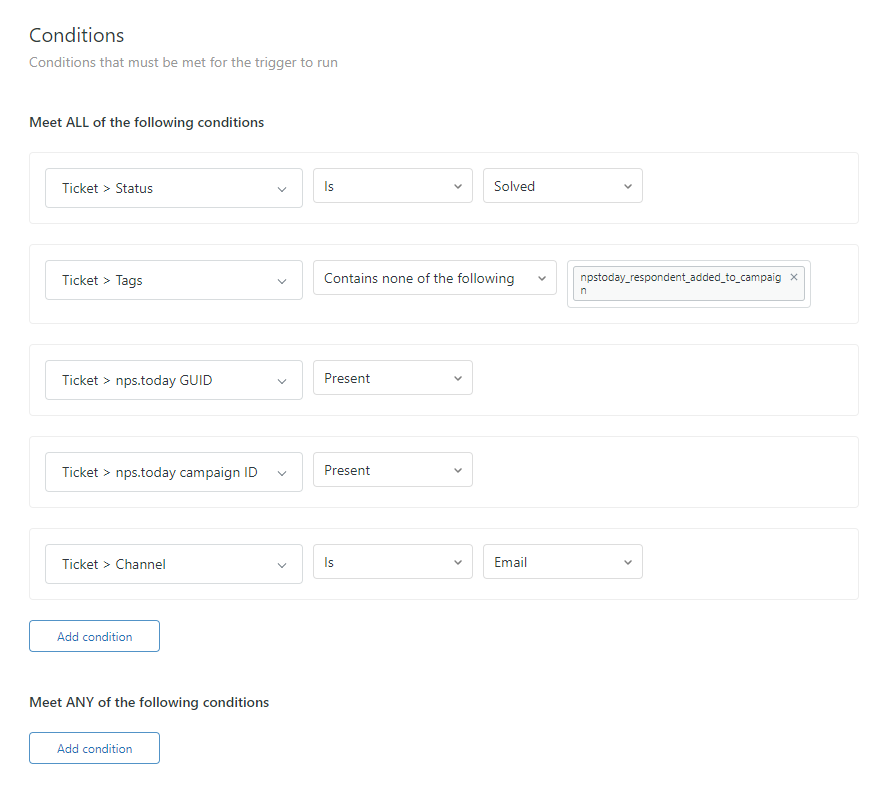
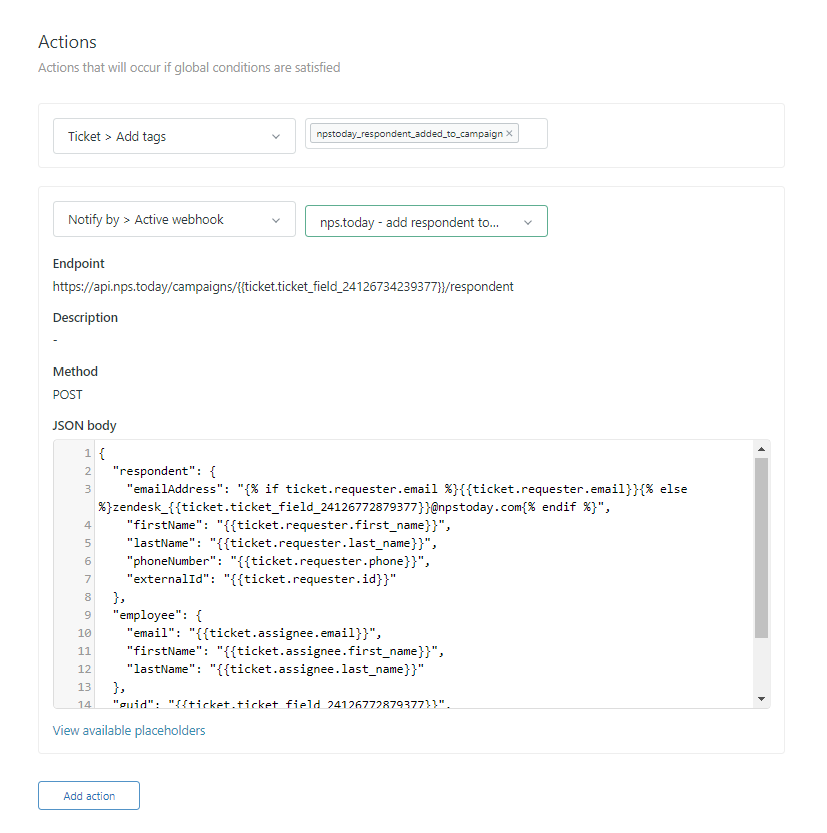
If you want to see more about setting up a survey trigger in Zendesk see here.
4. Chat/Messaging
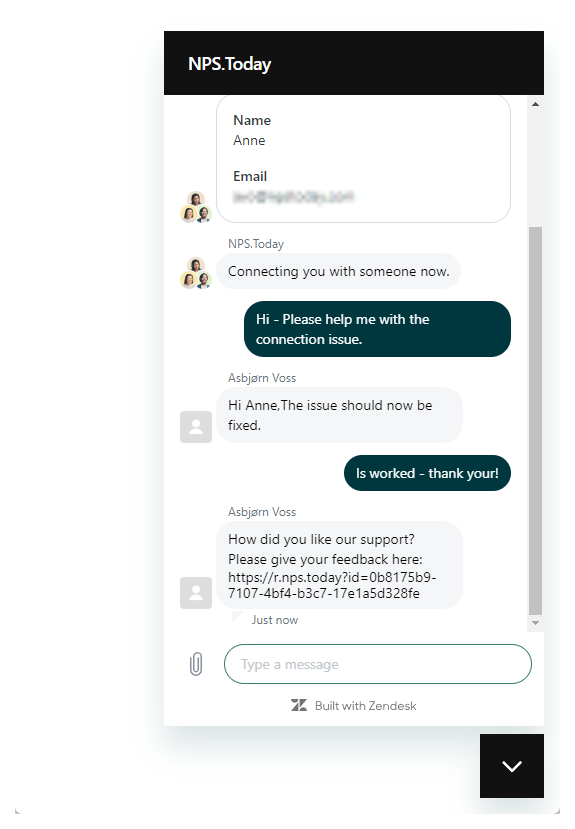
In the section "4. Chat (optional)" you see a describtion on how to enable a post messaging session survey.
Messaging survey example
Setup survey
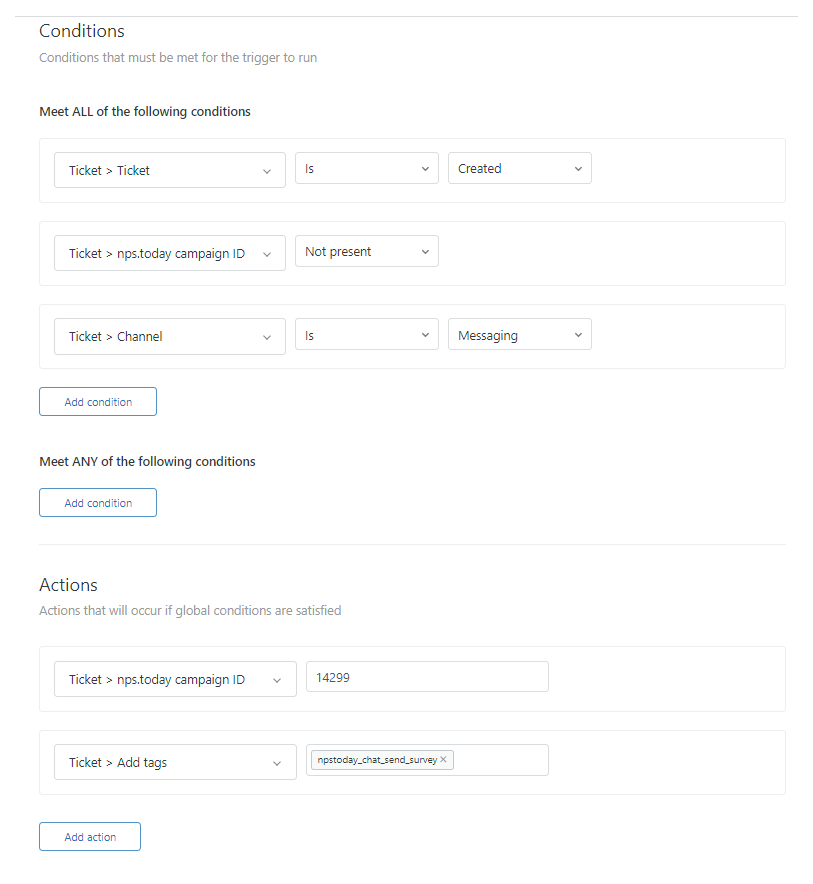
Setting up a survey in messaging you want to add the tag "npstoday_chat_send_survey" to tickets from the Channel "Messaging" and add the right campaignID from nps.today when the ticket is Created.
To set up the survey in a messaging session add a trigger in section 2.
Example of a trigger prompting a survey after end messaging session
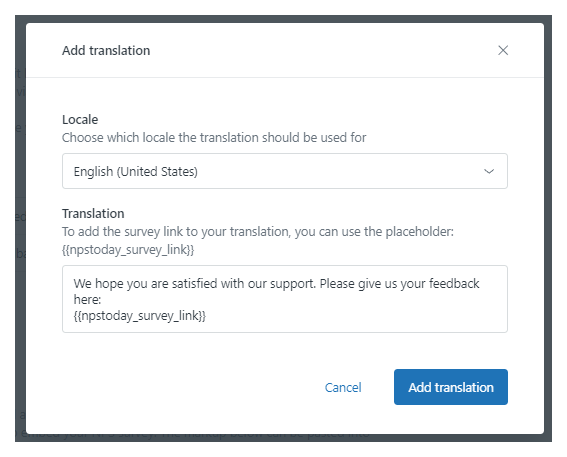
Add translation
You can also add translations to your survey in messaging. If a locale/language can't be detected on the requester, then a fallback translation is shown. The fallback translations is as shown below.
Translation fallbacks
English: "Please provide your feedback here:"
Danish: "Venligst giv din feedback her:"
Swedish: "Vänligen lämna din feedback här:"
Norwegian: "Vennligst gi din tilbakemelding her:"
French: "Veuillez fournir vos commentaires ici :"
Dutch: "Gelieve hier uw feedback te geven:"
Polish: "Proszę podać swoją opinię tutaj:"
Portuguese: "Por favor, forneça seu feedback aqui:"
German: "Bitte geben Sie hier Ihr Feedback ab:"
Spanish: "Por favor, proporcione sus comentarios aquí:"
Italian: "Si prega di fornire il proprio feedback qui:"
Finnish: "Ole hyvä ja anna palautteesi tässä:"
Locale/Language detection
When adding a translation, it is important, that you select the locale/language used to identify the language on the requester in the messaging session.
We recommend reading these Zendesk articles about language selecting and -detection:
How does Zendesk set a language for a user in Support?
See below example of adding an English translation:
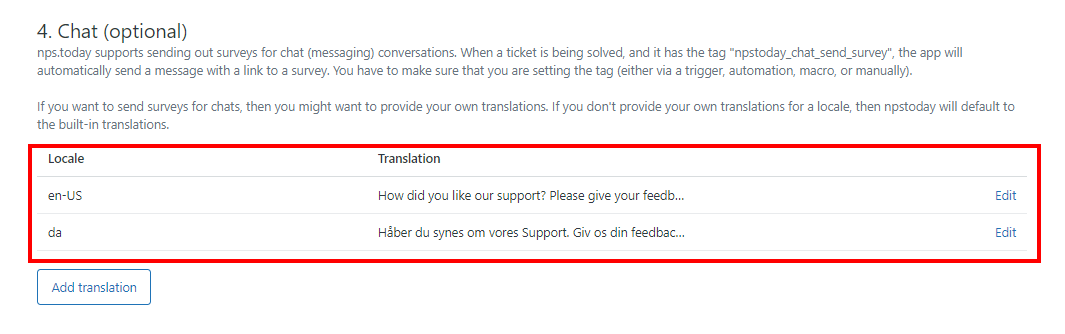
Below shows a set-up that has a Danish and English translation:
5. Embed survey
In the section "5. Send surveys from Zendesk (optional)" you will find an HTML code to embed surveys in a Zendesk email to send surveys directly from Zendesk.
HTML code for embedded survey
<table cellspacing="0"
cellpadding="0"
style="margin: 0 auto">
<tbody>
<tr>
<td colspan="21">
<h2 style="font-size:15px;margin-bottom:20px;text-align:center;">How likely is it that you would recommend us to a friend or colleague? </h2>
</td>
</tr>
<tr>
<td align="center"
width="30"
height="30"
bgcolor="#040606"
style="border-radius: 5px">
<a style="font-size: 16px; font-weight: bold; font-family: sans-serif; text-decoration: none; line-height: 30px; width: 100%; display:block; "
href="https://api.nps.today/Pages/reply.aspx?id={{ticket.ticket_field_14902864284305}}&rating=0">
<span style="color: #ffffff;"> 0 </span>
</a>
</td>
<td width="5px"> </td>
<td align="center"
width="30"
height="30"
bgcolor="#040606"
style="border-radius: 5px">
<a style="font-size: 16px; font-weight: bold; font-family: sans-serif; text-decoration: none; line-height: 30px; width: 100%; display: inline-block; "
href="https://api.nps.today/Pages/reply.aspx?id={{ticket.ticket_field_14902864284305}}&rating=1">
<span style="color: #ffffff;"> 1 </span>
</a>
</td>
<td width="5px"> </td>
<td align="center"
width="30"
height="30"
bgcolor="#040606"
style="border-radius: 5px">
<a style="font-size: 16px; font-weight: bold; font-family: sans-serif; text-decoration: none; line-height: 30px; width: 100%; display: inline-block; "
href="https://api.nps.today/Pages/reply.aspx?id={{ticket.ticket_field_14902864284305}}&rating=2">
<span style="color: #ffffff;"> 2 </span>
</a>
</td>
<td width="5px"> </td>
<td align="center"
width="30"
height="30"
bgcolor="#040606"
style="border-radius: 5px">
<a style="font-size: 16px; font-weight: bold; font-family: sans-serif; text-decoration: none; line-height: 30px; width: 100%; display: inline-block; "
href="https://api.nps.today/Pages/reply.aspx?id={{ticket.ticket_field_14902864284305}}&rating=3">
<span style="color: #ffffff;"> 3 </span>
</a>
</td>
<td width="5px"> </td>
<td align="center"
width="30"
height="30"
bgcolor="#040606"
style="border-radius: 5px">
<a style="font-size: 16px; font-weight: bold; font-family: sans-serif; text-decoration: none; line-height: 30px; width: 100%; display: inline-block; "
href="https://api.nps.today/Pages/reply.aspx?id={{ticket.ticket_field_14902864284305}}&rating=4">
<span style="color: #ffffff;"> 4 </span>
</a>
</td>
<td width="5px"> </td>
<td align="center"
width="30"
height="30"
bgcolor="#040606"
style="border-radius: 5px">
<a style="font-size: 16px; font-weight: bold; font-family: sans-serif; text-decoration: none; line-height: 30px; width: 100%; display: inline-block; "
href="https://api.nps.today/Pages/reply.aspx?id={{ticket.ticket_field_14902864284305}}&rating=5">
<span style="color: #ffffff;"> 5 </span>
</a>
</td>
<td width="5px"> </td>
<td align="center"
width="30"
height="30"
bgcolor="#040606"
style="border-radius: 5px">
<a style="font-size: 16px; font-weight: bold; font-family: sans-serif; text-decoration: none; line-height: 30px; width: 100%; display: inline-block; "
href="https://api.nps.today/Pages/reply.aspx?id={{ticket.ticket_field_14902864284305}}&rating=6">
<span style="color: #ffffff;"> 6 </span>
</a>
</td>
<td width="5px"> </td>
<td align="center"
width="30"
height="30"
bgcolor="#040606"
style="border-radius: 5px">
<a style="font-size: 16px; font-weight: bold; font-family: sans-serif; text-decoration: none; line-height: 30px; width: 100%; display: inline-block; "
href="https://api.nps.today/Pages/reply.aspx?id={{ticket.ticket_field_14902864284305}}&rating=7">
<span style="color: #ffffff;"> 7 </span>
</a>
</td>
<td width="5px"> </td>
<td align="center"
width="30"
height="30"
bgcolor="#040606"
style="border-radius: 5px">
<a style="font-size: 16px; font-weight: bold; font-family: sans-serif; text-decoration: none; line-height: 30px; width: 100%; display: inline-block; "
href="https://api.nps.today/Pages/reply.aspx?id={{ticket.ticket_field_14902864284305}}&rating=8">
<span style="color: #ffffff;"> 8 </span>
</a>
</td>
<td width="5px"> </td>
<td align="center"
width="30"
height="30"
bgcolor="#040606"
style="border-radius: 5px">
<a style="font-size: 16px; font-weight: bold; font-family: sans-serif; text-decoration: none; line-height: 30px; width: 100%; display: inline-block; "
href="https://api.nps.today/Pages/reply.aspx?id={{ticket.ticket_field_14902864284305}}&rating=9">
<span style="color: #ffffff;"> 9 </span>
</a>
</td>
<td width="5px"> </td>
<td align="center"
width="30"
height="30"
bgcolor="#040606"
style="border-radius: 5px">
<a style="font-size: 16px; font-weight: bold; font-family: sans-serif; text-decoration: none; line-height: 30px; width: 100%; display: inline-block; "
href="https://api.nps.today/Pages/reply.aspx?id={{ticket.ticket_field_14902864284305}}&rating=10">
<span style="color: #ffffff;"> 10 </span>
</a>
</td>
</tr>
<tr>
<td colspan="11">
<div style="margin-top:10px">Not likely at all</div>
</td>
<td colspan="10"
align="right">
<div style="margin-top:10px">Very likely</div>
</td>
</tr>
</tbody>
</table>