Uploading historical data to the nps.today platform
Intro
When uploading historical data to the nps.today platform the following endpoint can be used:
POST:
https://api.nps.today/popup/{campaignID}/response
Read more about the endpoint documentation here.
Use-case
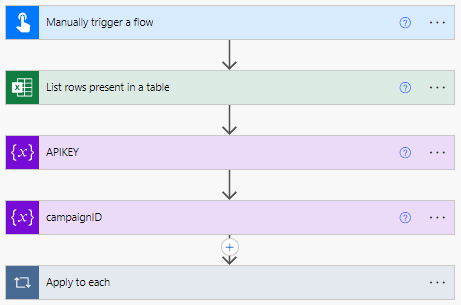
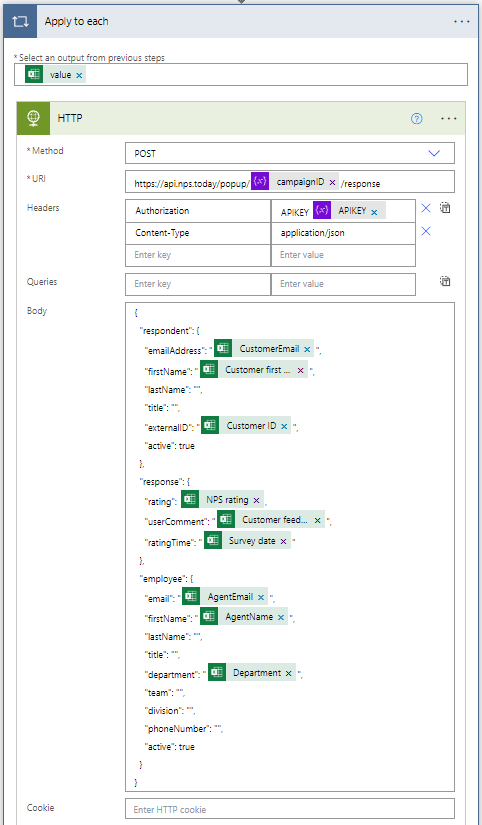
The historical data is placed in an Excel spreadsheet and Power Automate can then run a flow similar to this:
Example payload
{
"respondent":{
    "emailAddress":"@{items('Apply_to_each')?['CustomerEmail']}",
    "firstName":"@{items('Apply_to_each')?['Customer first name']}",
    "lastName":"",
    "title":"",
    "externalID":"@{items('Apply_to_each')?['Customer ID']}",
    "active":true
},
"response":{
    "rating":"@"{
        "items(""Apply_to_each"")?"[
            "NPS rating"
        ]
    },
    "userComment":"@{items('Apply_to_each')?['Customer feedback']}",
    "ratingTime":"@{items('Apply_to_each')?['Survey date']}"
},
"employee":{
    "email":"@{items('Apply_to_each')?['AgentEmail']}",
    "firstName":"@{items('Apply_to_each')?['AgentName']}",
    "lastName":"",
    "title":"",
    "department":"@{items('Apply_to_each')?['Department']}",
    "team":"",
    "division":"",
    "phoneNumber":"",
    "active":true
}
}