Utilize your customer experience data
This chapter describes how you can fetch data from nps.today and use it to show customer experience data to the users of the system.
NPS Feedback App
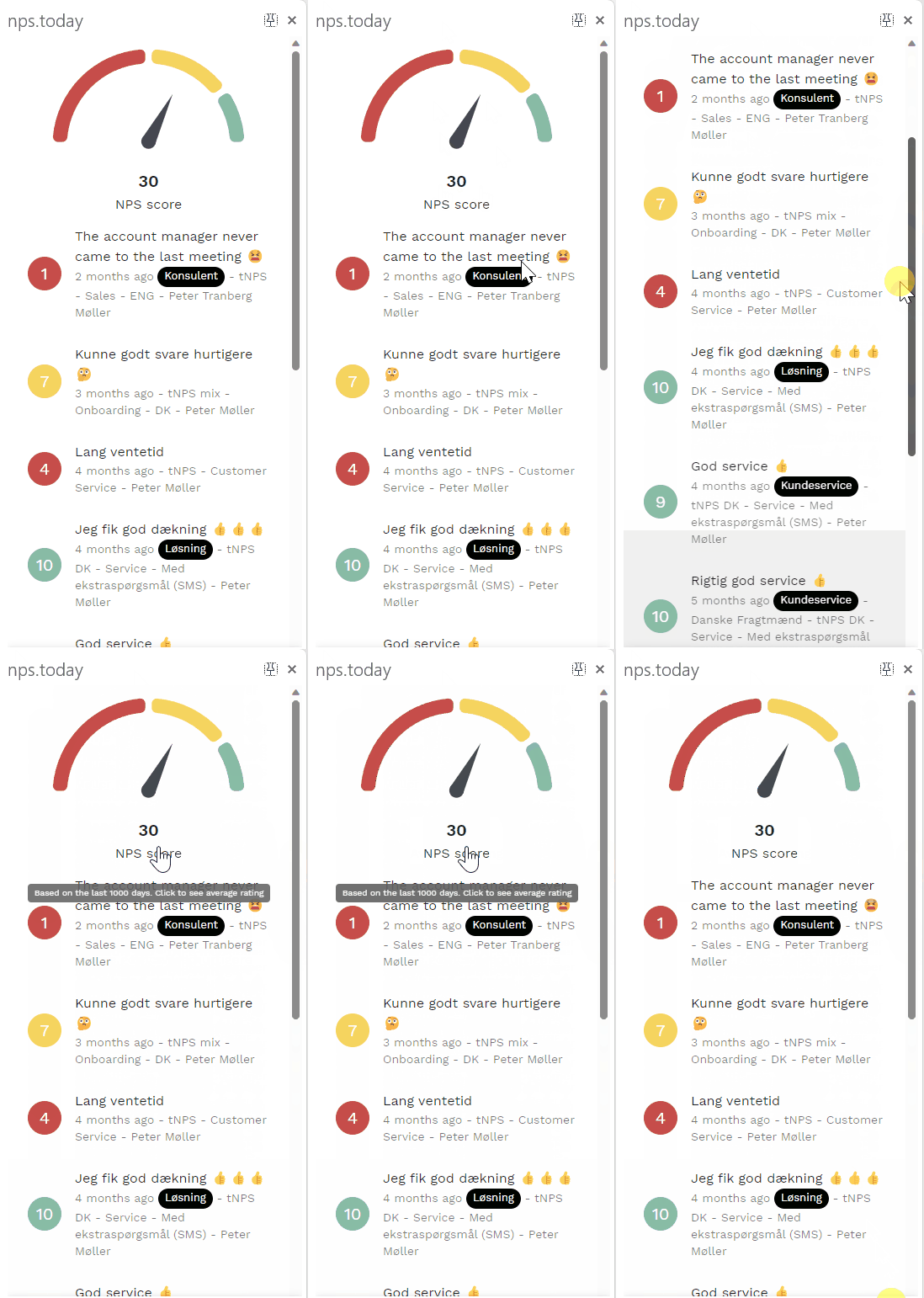
The feedback app is built as an easy way for systems to visualize customer responses data to the users. Not all system has the functionality to use the Feedback App. In this case, go to the next chapter.
To see more technical documentation on the Feedback App please click here.
If you want to see how it is used in our Dixa integration click here.
Below is an example of the Feedback App:
Get data with our API
With data back we refer to a third-party system consuming data from nps.today and displaying it to its user. The complexity of how to display data from nps.today depends on the functionalities available in the system.
Below is the flow from triggering a survey to retrieving the response back into the system:

To retrieve data from nps.today to use for an external system our API gives you several solutions.
For adding responses directly to other systems use the following endpoint:
GET responses (all campaigns):
https://api.nps.today/campaigns/responses
Use our /bi/ endpoints
Many of our customers are retrieving data to their data warehouse to use the data from there. Here a mix of our v2/bi/ endpoints can be used to retrieve the data you need.
Limit on 300,000 records
There is a limit for 300,000 records per request. If the take parameter is bigger than the maximum of 300,000 an error will be thrown.
Max 10,000 records at a time recommended
If you need more than 10.000 record we recommened you to use pagination.
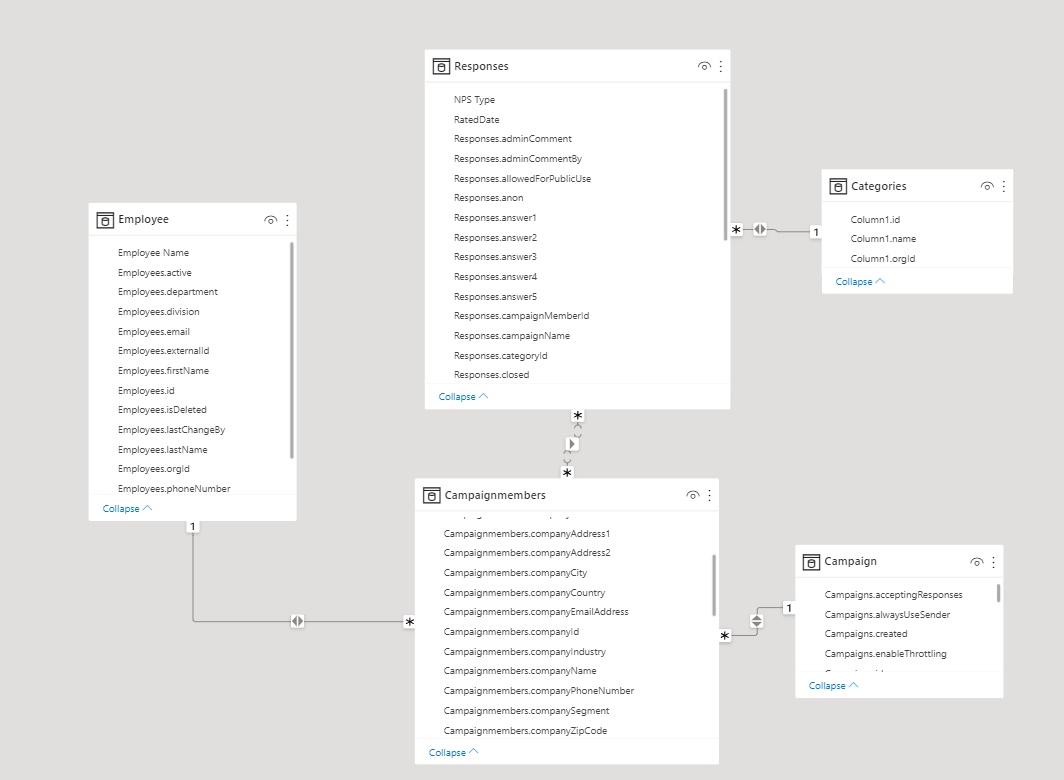
Often a combination of the endpoints below are used as, for example, the campaign member endpoint contains the custom data field which is often used to map meta data on a respondent when added to nps.today from an external system.
https://api.nps.today/v2/bi/responses
https://api.nps.today/v2/bi/campaignmembers
https://api.nps.today/v2/bi/campaigns
https://api.nps.today/v2/bi/employees
https://api.nps.today/v2/bi/responsecategories
Unique identifiers
To combine data from the different /v2/bi/ endpoints you can use unique identifiers.
- Use campaignMemberId as the unique identifier to combine data between the campaign member and the response
- Use employeeId to combine data between the campaign member and the employee.
- Use campaignId to combine data between the campaign member and the campaign.
- Use categoryId to combine data between the response and the category.
Get responses with a webhook
To retrieve data from an nps.today account you can create a webhook subscription.
Here is an example on how a "create webhook subscription" could look like:
curl --location 'https://api.nps.today/webhooks/subscriptions' \
--data '{
    "action": "Create",
    "model": "Response",
    "url": "https://webhook.site/example-webhook-url",
    "filter": {
        "include": {
            "campaignId": 1234
        },
        "exclude": {
            "id": 1232345125
        }
    }
}'
"Create subscriptions" uses the following endpoint:
https://api.nps.today/webhooks/subscriptions
- action: this is the database operation
- model: this is the database entity
- url: a POST request is sent to this URL
- filter: the purpose of filter is to include or exclude certain webhook calls when a database operation has occurred
- include: decides what criteria you want to INCLUDE in your webhook subscription
- exclude: decides what criteria you want to EXCLUDE in your webhook subscription
Above subscription example listens to created responses on a campaign with the ID "1234" and excludes responses with responseID "1232345125".
After creating the webhook subscription, these conditions will trigger webhook calls from that point on. Every time these conditions are fulfilled, a POST request will be sent to the URL given. In above example the URL is "https://webhook.site/example-webhook-url".
For more information on how to create a webhook subscription click here.
For more information on other webhook endpoints click here.
Data by campaign
In your nps.today campaign builder you can use webhooks to listen to specific campaigns.
If your system does not provide you with an API you can retrieve responses with a webhook in nps.today. Please read the this guide.
Using Skip/Take for Pagination in API Requests
To use our API to pull large amount af data we recommend you to use pagination. This section gives you an example on how you can work with pageination when pulling data.
AI created content
This section was mainly created by an AI, and edidted by nps.today.
Understanding Pagination with Skip/Take
When fetching data from an API, pagination helps control how many records you receive at a time. The Skip/Take approach works as follows:
- Skip: The number of records to skip before fetching results.
- Take: The number of records to fetch in one request.
- Total: The total number of records available.
This method ensures you don’t load too much data at once, improving performance.
Making a Paginated Request
To fetch data from an API using pagination, send a request with skip and take parameters.
Example Request (Fetching the First Page)
GET https://api.example.com/items?skip=0&take=10
Example Request (Fetching the Second Page)
GET https://api.example.com/items?skip=10&take=10
take=10, we increase skip by 10 (skip=10) to get the next set of results.
Handling the API Response
A paginated response typically includes metadata at the root level to help request the next page.
Example API Response
{
    "data": [
        { "id": 101, "name": "Item 1" },
        { "id": 102, "name": "Item 2" }
    ],
    "total": 50,
    "skip": 10,
    "take": 10
}
total: Total number of records available.-
skip: Number of records skipped.-
take: Number of records returned.
Fetching the Next Page Dynamically
Use the total field to check if there are more pages:
1. Calculate the next skip value:
let nextSkip = currentSkip + take;
let hasMorePages = (nextSkip < total);
GET https://api.example.com/items?skip=20&take=10
Stopping When No More Pages Exist
If skip + take >= total, stop fetching because all data has been retrieved.
Example: Handling Pagination in a Loop (JavaScript)
async function fetchAllPages() {
    let skip = 0;
    let take = 10;
    let total = null;
    let allData = [];

    do {
        let response = await fetch(`https://api.example.com/items?skip=${skip}&take=${take}`);
        let result = await response.json();

        allData.push(...result.data);
        total = result.total;

        skip += take;
    } while (skip < total);

    console.log("All data retrieved:", allData);
}
fetchAllPages();
Summary
✔ Use skip=0 and take=10 for the first page.
✔ Increase skip by take for the next page.
✔ Check total to know when to stop.
✔ Automate pagination with a loop for large datasets.
This ensures efficient and seamless data retrieval in paginated APIs. 🚀