Generate your own survey links (embedded surveys)
This guide collects the different ways to generate an nps.today survey link yourself, so you can send or embed it from your own system (an ESP such as Agillic, a CRM, or a newsletter tool) instead of letting nps.today send the email. In every case the survey is still created and reported in nps.today, only the delivery happens in your system.
To keep responses tied to a person (not anonymous), you generate a personalized link that carries the respondent's data.
Which method should I use?
| Method | API key | Hashing / secret | Campaign member created | Best for |
|---|---|---|---|---|
| 1. Personalized link via script | No | Yes | On reply | Bulk sends from your own email/ESP, generated upstream in a script or middleware |
2. API (GenerateLink) |
Yes | No | At generation | Systems that can call the API and prefer not to hash |
The "Campaign member created" column matters for volume: On reply means nothing is recorded in nps.today until the respondent actually answers, while At generation creates the member up front.
Prerequisites
- An nps.today campaign. You'll need its campaignID (the numeric id, e.g.
19090). See How to find campaignID. - For the script method: the campaign Secret.
- Open the campaign
- Click Send Out Survey
- Go to the Unique Personalized Link tab
- Click the eye icon in the Secret field
- Copy the value
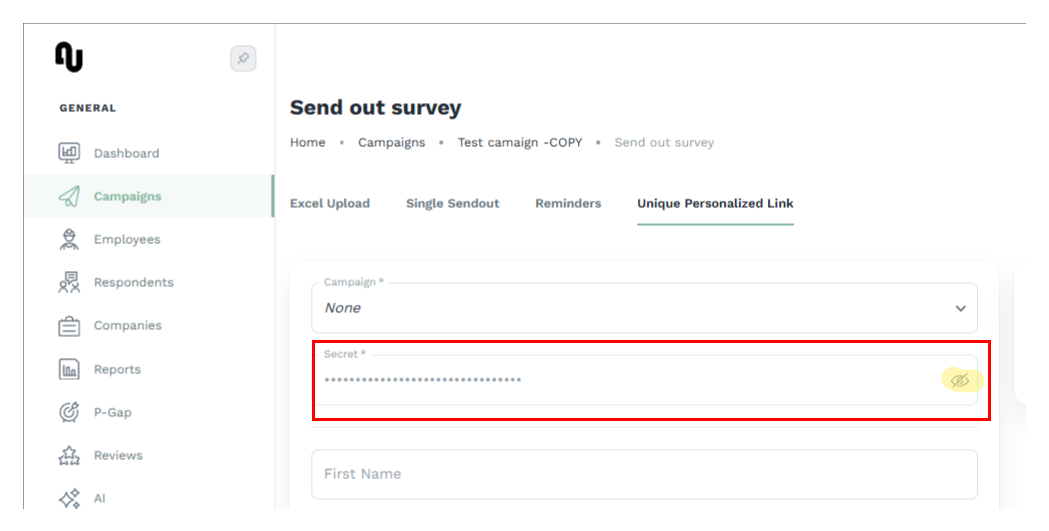
- For the API method: an nps.today API key and the API module. See How to create an API key.
- A system that can insert the link into an email.
Keep responses identifiable
Include at least one identifying field in the link (typically email and/or ext, your own
contact id). Without any respondent data the response cannot be linked back to a person.
1. Generate a personalized link with a script
A personalized link is a campaign‑specific, single‑use link that you build and sign yourself, with
no API call. It carries the respondent's details and a signature (sha) so nps.today can trust it.
Review script example
This section wil refer to this script.
See code examples to get you started if you wish to generate the link using a script: Generate link with script.
Campaign member creation
The campaign member is created only when the respondent answers. No campaign member or response is recorded in nps.today until then, which makes this a good fit for large sends where you expect a low response rate.
The link format is:
https://r.nps.today?cid=19090&firstName=John&lastName=Doe&[email protected]&phone=4512345678&ext=CRM-42&id=<GUID>&employee=&sha=7fab5a3b9d39321213ee6d7dc7a30990a820f2a3239623d078f2a42dd6051976
cid: your campaignID.
id: a unique GUID you generate for each recipient. This is what makes every link unique and single‑use.
firstName, lastName, email, phone, ext, employee: optional fields. Include at least one identifying field for non‑anonymous responses. Omit any field you don't use.
sha: the signature (see below).
You can also append your own custom fields after sha. Any field name that isn't reserved is
stored as custom data on the respondent.
Calculating the sha
The sha is a SHA‑256 hash that proves the link was generated by you. You create one per recipient.
In practice:
- Collect the field values for the recipient, for the fields you intend to include.
- Build the content string: concatenate the values into a single string, in this exact order,
with no separators, and your secret added at the very end:
If you don't use a field, leave it out of both the string and the URL, and keep the remaining fields in the same order.
cid + firstName + lastName + email + phone + ext + id + employee + secret - Hash it with SHA‑256 and take the lowercase hex output. That string is your
sha. - Assemble the URL from the raw field values plus
&sha=, then URL‑encode the finished URL. Theshais hex, so encoding doesn't change it.
Only these fields are hashed
Only the fields listed above go into the hash. Custom fields, rating, and the sha itself
are never part of the hashed string. It is a plain hash, not an HMAC — the secret is simply the
last thing concatenated before hashing.
Worked example
With the following values (and a fixed id so it's reproducible):
| Field | Value |
|---|---|
| cid | 19090 |
| firstName | John |
| lastName | Doe |
[email protected] |
|
| phone | 4512345678 |
| ext | 42 |
| id | b77063db-181c-4084-957f-590c04de255c |
| employee | [email protected] |
| secret | 12C48F78F6BQ141EDC9B71C48367251E (example only — use your own) |
the content string is:
19090JohnDoejohn@example.com451234567842b77063db-181c-4084-957f-590c04de255cemployee@company.com12C48F78F6BQ141EDC9B71C48367251E
Notice the string has no field value like ?cid= or &firstName=
prefixes and no separators. Those are added only when you build the URL.
and its SHA‑256 hex is:
861643e614da458e5d46c134293a5fe8e3ea49209bf6c9e91c9d9eeac2113d70
The hash depends on the exact values, the id, and your secret, so every recipient's link has a
different sha.
Where to generate it in practice
Most email systems can't compute a SHA‑256 inside a template, so don't try to hash in the email editor. Generate the finished link upstream in a small script, your CRM, or middleware (for example a Power Automate flow or a function) using one of the snippets below and then pass the complete URL into your email as a personalization / merge field.
2. Generate links via the API
If you'd rather not compute a hash or hold the secret in your own system, you can let nps.today mint the link for you. Call the Generate link endpoint per respondent, map the respondent's data in the request, and embed the link it returns:
Campaign member creation
A campaign member is generated as soon as you call GenerateLink. While this increases overall survey volume (since it occurs before submission), it enables you to track and calculate response rates.
The returned id references this pre-existing campaign member in nps.today.
See the endpoint in the API reference.
The returned link can be used in its short form, where id refers to the campaign member the API
already created and mapped, so no cid or sha is needed.
URL:
https://api.nps.today/campaigns/{campaignId}/GenerateLink
Here is an example of the body:
[
    {
        "respondent": {
            "emailAddress": "[email protected]",
            "firstName": "John",
            "lastName": "Doe",
            "company": {
                "name": "nps.today"
            }
        },
        "employee": {
            "email": "[email protected]",
            "firstName": "Janne",
            "lastName": "Hansen"
        },
        "custom": {
            "ticketid": "1209381dsf1"
        }
    }
]
The returned id (GUID) is used together with the base URL;
81ad980e-a6ca-4ae4-a38e-d627d8551926
Base URL:
https://r.nps.today
Unique survey link:
https://r.nps.today?id=81ad980e-a6ca-4ae4-a38e-d627d8551926
https://r.nps.today?id=81ad980e-a6ca-4ae4-a38e-d627d8551926&rating=0
https://r.nps.today?id=81ad980e-a6ca-4ae4-a38e-d627d8551926&rating=1
https://r.nps.today?id=81ad980e-a6ca-4ae4-a38e-d627d8551926&rating=2
https://r.nps.today?id=81ad980e-a6ca-4ae4-a38e-d627d8551926&rating=3
https://r.nps.today?id=81ad980e-a6ca-4ae4-a38e-d627d8551926&rating=4
https://r.nps.today?id=81ad980e-a6ca-4ae4-a38e-d627d8551926&rating=5
https://r.nps.today?id=81ad980e-a6ca-4ae4-a38e-d627d8551926&rating=6
https://r.nps.today?id=81ad980e-a6ca-4ae4-a38e-d627d8551926&rating=7
https://r.nps.today?id=81ad980e-a6ca-4ae4-a38e-d627d8551926&rating=8
https://r.nps.today?id=81ad980e-a6ca-4ae4-a38e-d627d8551926&rating=9
https://r.nps.today?id=81ad980e-a6ca-4ae4-a38e-d627d8551926&rating=10
Confirm the request/response against the API reference
Take the exact request body and response shape for GenerateLink from the
API reference
rather than assuming them.
Verify your setup
- Generate a single link with test values and open it in a browser.
- Submit a rating, then confirm the response and the mapped fields appear on the campaign in nps.today.
- For the script method, also generate one link in the app (Send Out Survey → Unique Personalized
Link) with the same values and compare the
sha. If they match, your secret and field order are correct, and you can move to production.
Tip
Test with one record before rolling out to a full list.
Related guides
Need a hand? Reach out to nps.today support via the support page.