Branded Links
A branded link makes the survey and SMS links nps.today sends use your own domain
(for example feedback.acme.com) instead of the default r.nps.today address — keeping your
brand in front of respondents.
Setting it up is two parts:
-
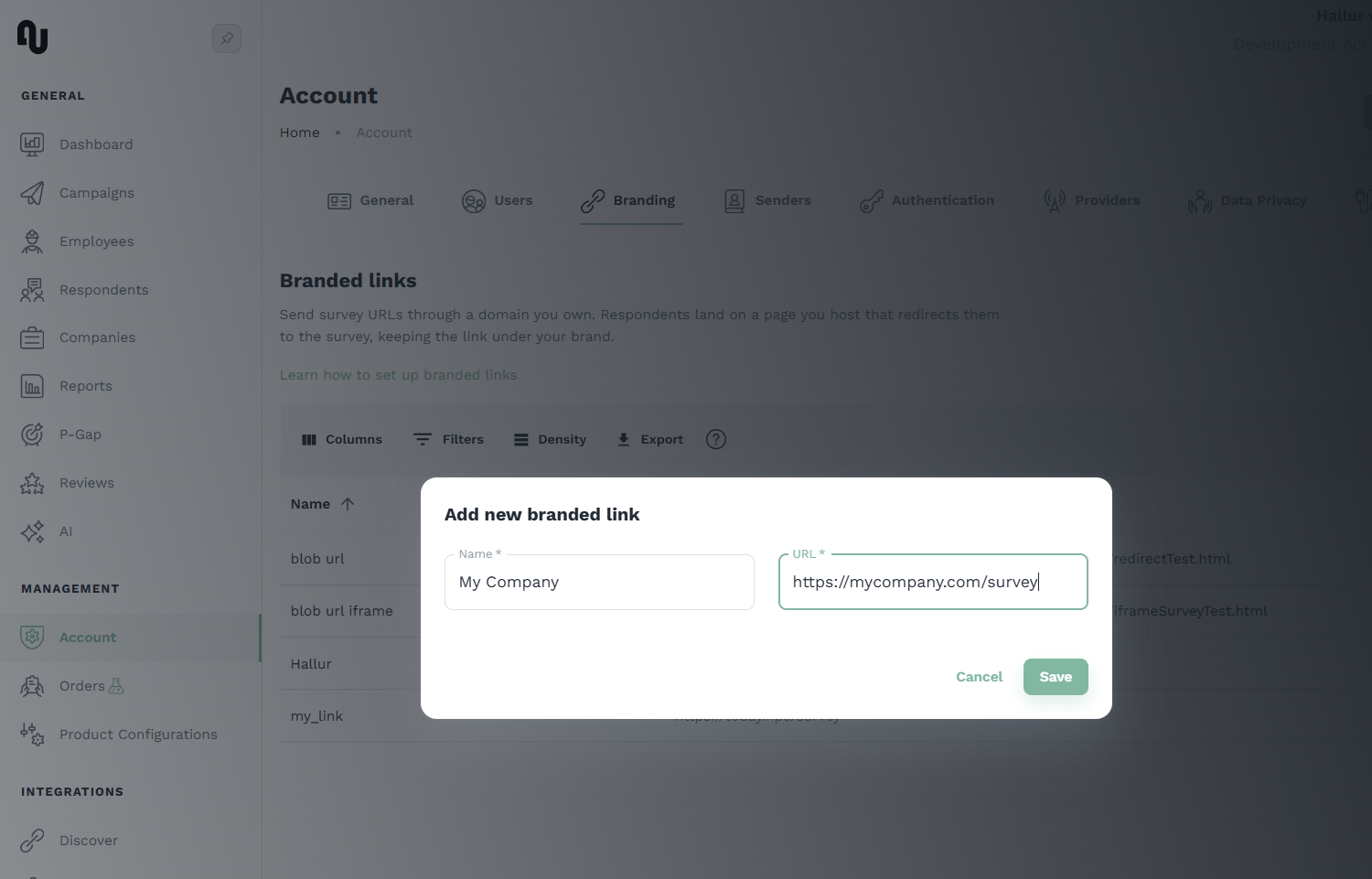
In nps.today — first, add a branded link to your organization under Account → Branding:
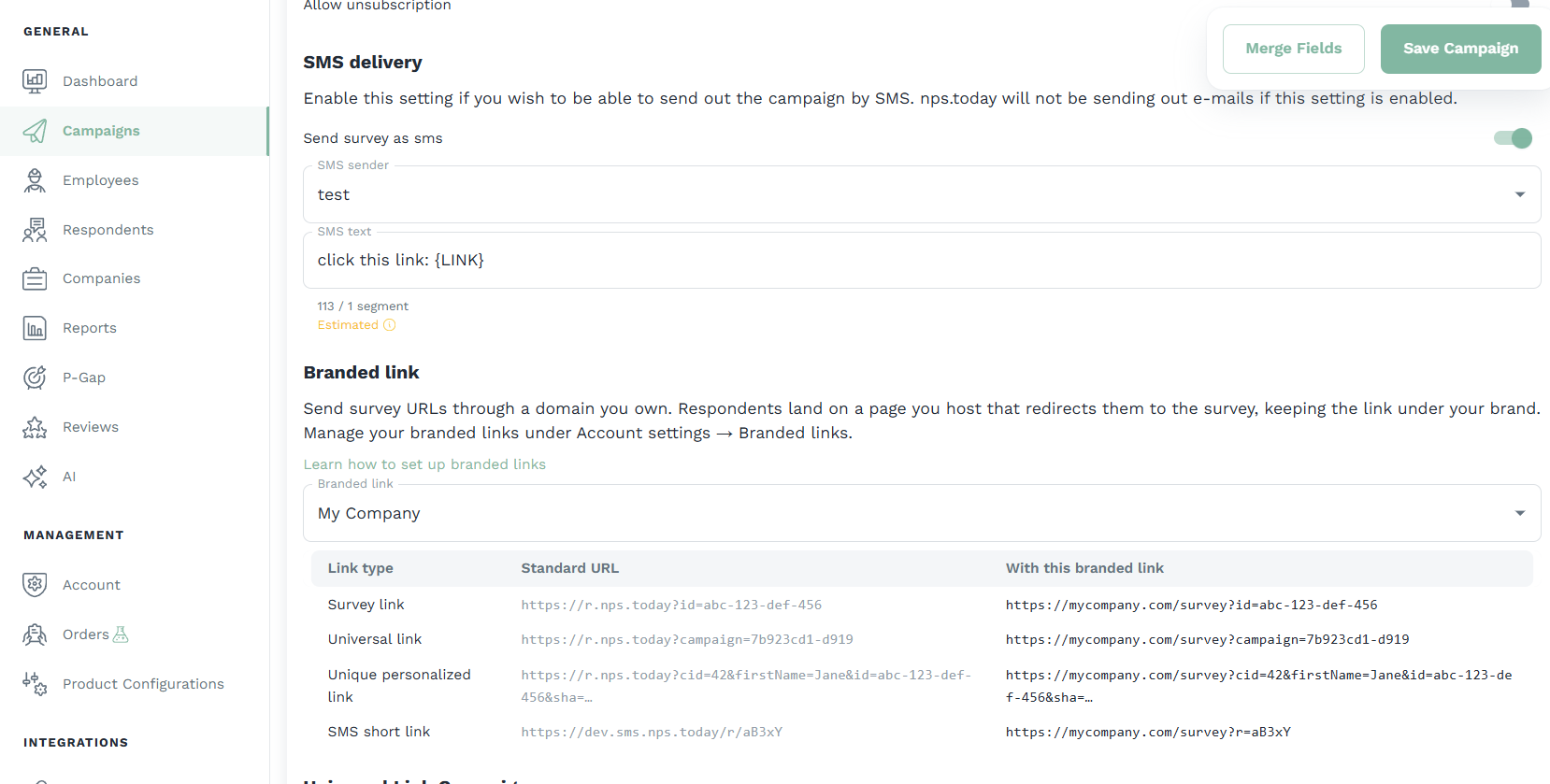
Then select it on a campaign under Campaign editor → Settings. From then on, every survey and SMS link for that campaign is issued on your domain:
-
On your domain — forward those incoming requests on to nps.today, using the redirect described below.
Prerequisites
- A branded URL served over HTTPS that you control — typically a domain or subdomain
(e.g.
https://feedback.acme.com). Any reachable HTTPS page works, since the code travels in the query string. - The branded link created in nps.today and selected on the campaign.
- The ability to publish a small page (or a redirect rule) at that URL.
- A user with a branded link permission.
What the respondent sees
The link a respondent clicks shows your branded domain; once the survey opens, the address bar
switches to r.nps.today. The redirect itself is instant.
How the links are shaped
nps.today appends everything to your branded URL as a query string, so the same page handles both
kinds of link. Survey links carry the respondent/campaign identifier; SMS links carry a short code in
an r parameter:
| Link type | On your domain | Forwards to |
|---|---|---|
| Survey — email, universal, and personalized | https://feedback.acme.com?id=… (also ?campaign=…, ?cid=…) |
https://r.nps.today/?… |
| SMS | https://feedback.acme.com?r=<code> |
https://sms.nps.today/r/<code> |
So your page applies one rule:
?r=<code>present → SMS — forward tohttps://sms.nps.today/r/<code>, keeping any other parameters (such asunsub=true).- Otherwise → survey — forward the query string to
https://r.nps.today/. This covers every survey type, no matter which parameters it uses (id,campaign,cid, …).
Works on any host — no rewrites needed
Because everything is in the query string, your page is always served by its normal URL and the query simply rides along. There's no catch-all routing or path rewrites to configure, so this works on plain static hosting (e.g. blob/object storage) just as well as on a full web server.
Setting up the redirect
The snippets below are examples
The code on this page is a recommended starting point. Adapting it to your platform and deploying, hosting, and maintaining it in your environment is your own developers' responsibility.
Publish an HTML page on your branded domain and paste this script as high in the <head> as possible,
so the redirect happens before anything renders.
<script>
(function () {
  // ===== Forward to nps.today =====
  var SURVEY_HOST = "https://r.nps.today";
  var SMS_HOST    = "https://sms.nps.today";
  // ================================
  try {
    var params  = new URLSearchParams(window.location.search);
    var smsCode = params.get("r");
    // Survey links always carry id/campaign/cid; treat those as a survey even if an "r" is present.
    var isSurvey = params.has("id") || params.has("campaign") || params.has("cid");

    var target;
    if (smsCode && !isSurvey) {
      // SMS link: ?r=<code> -> SMS host /r/<code>, keeping any other params (e.g. unsub=true).
      params.delete("r");
      var rest = params.toString();
      target = SMS_HOST + "/r/" + smsCode + (rest ? "?" + rest : "");
    } else {
      // Survey link (?id=, ?campaign=, ?cid=, …): forward the query to the survey host.
      target = SURVEY_HOST + "/" + window.location.search;
    }

    // replace() keeps your branded URL out of history so Back doesn't loop here.
    window.location.replace(target);
  } catch (e) {
    window.location.href = "https://r.nps.today";
  }
})();
</script>
Prefer a server or edge redirect?
You can apply the same rule with a 302 redirect at the edge or on your web server instead of an
HTML page (Cloudflare Workers, nginx, Apache, IIS, …): send requests carrying ?r=<code> to
https://sms.nps.today/r/<code> and everything else to https://r.nps.today/, preserving the
query string.
Alternative: embed in an iframe
Redirecting is the reliable default
We have no current or future plans to block surveys from being embedded, and we hope we never have to — and if that ever has to change, we'll contact you in advance. Still, because an iframe depends on that, if you want your integration to be reliable and always work, we recommend redirecting instead.
Instead of redirecting, serve this page on your branded domain. It loads the matching nps.today link in a full-page iframe, so the address bar keeps showing your branded domain throughout the survey. It picks the destination with the exact same rule as the redirect.
<!doctype html>
<html lang="en">
<head>
  <meta charset="utf-8">
  <meta name="viewport" content="width=device-width, initial-scale=1">
  <meta name="robots" content="noindex">
  <title>Survey</title>
  <style>
    html, body { margin: 0; height: 100%; }
    iframe { border: 0; width: 100%; height: 100%; display: block; }
  </style>
</head>
<body>
  <iframe id="survey" title="Survey"></iframe>
  <script>
  (function () {
    // ===== Forward to nps.today =====
    var SURVEY_HOST = "https://r.nps.today";
    var SMS_HOST    = "https://sms.nps.today";
    // ================================
    try {
      var params  = new URLSearchParams(window.location.search);
      var smsCode = params.get("r");
      var isSurvey = params.has("id") || params.has("campaign") || params.has("cid");

      var target;
      if (smsCode && !isSurvey) {
        params.delete("r");
        var rest = params.toString();
        target = SMS_HOST + "/r/" + smsCode + (rest ? "?" + rest : "");
      } else {
        target = SURVEY_HOST + "/" + window.location.search;
      }

      document.getElementById("survey").src = target;
    } catch (e) {
      window.location.href = "https://r.nps.today";
    }
  })();
  </script>
</body>
</html>
One thing to test with iframes
Inside an iframe the survey runs in a third-party context, so browser privacy protections (Safari, Chrome) can disable features that rely on stored state — such as resuming a partly-finished universal-link survey. Test those flows if your campaigns rely on them.
Test before going live
In app.nps.today, open a test campaign, click Edit, select your branded link (Campaign editor → Settings), and click Save. Every survey and SMS link for that campaign is now issued on your branded domain.
Send a single test survey
Send yourself one survey using whichever method you plan to use:
- Email or SMS survey — add a single campaign member with your own email address (and phone number for SMS). The survey is sent to you, with the link on your branded domain.
- Unique personalized link — use the Unique Personalized Link button on the campaign to generate a link, then open it.
- Universal link — open the campaign's universal link (or scan its QR code).
Open the link, complete the survey, and submit a test answer. If your domain is forwarding correctly, the survey opens and your test response appears on the campaign in app.nps.today.