Puzzel call flow
The call flow is what triggers a survey when a call ends. When the call has ended, the call flow sends the call details to nps.today, and nps.today surveys the caller with the campaign linked to the queue.
This page shows how to link campaigns to queues, choose which queues send surveys, and set up outbound calls. The call flow signs in to Puzzel with a Puzzel ID client, which is set up in Call flow authentication.
For the whole set-up, see the Puzzel set-up overview.
Link campaigns to Puzzel queues
To send out surveys when a call has ended, link your campaign(s) to queue(s) in Puzzel.
- Go to the Puzzel admin portal and find the queue keys needed, or go to developer.puzzel.com and call the endpoint to get a list of all your queues.
- Go to the IVR section on app.nps.today, click Add IVR, and follow the guide to add the link.
- When the call flow is set up, confirm that everything works by going to agent.puzzel.com and making a test call.
Inbound calls
Create the control variable
The control variable npstoday_enabled decides whether the call flow sends a request to nps.today. A request is only sent when npstoday_enabled = true.
The variable can be assigned at various points in the call flow, so you can control which queues have it enabled.
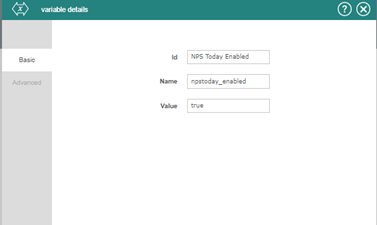
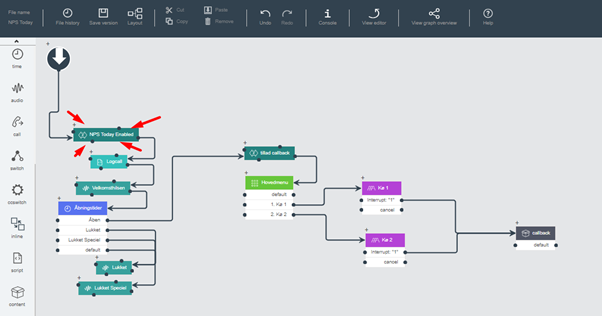
If you want it enabled for all queues, assign it in the first module of the call flow.
NPS enabled for all queues
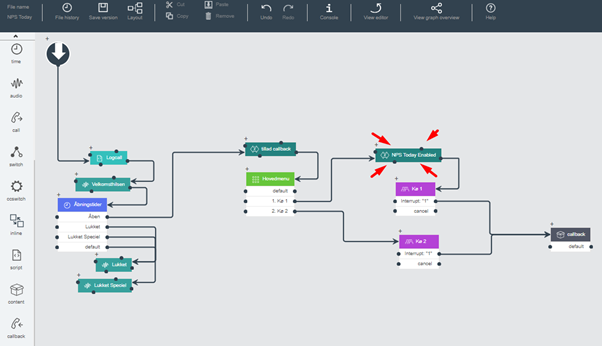
If you only want it enabled for a single queue, assign it just before that queue instead.
NPS enabled for a single queue
Add the nps.today lines to the finally script
Two lines in the call flow's finally script load your auth file and the nps.today script when the call has ended:
<include expression="npstoday_enabled = true" src="/$(system_custkey)/Integration/puzzel_id_auth.xml"/>
<include expression="npstoday_enabled = true" src="/450893/Integration/NPSToday_CallEnded_v2.xml"/>
The lines are added by your Puzzel certified partner or Puzzel Support, together with the auth file. See Step 5 in Call flow authentication.
When you add a new queue
If npstoday_enabled is set for all queues, a new queue is included automatically. If you set it for individual queues, assign it to the new queue as well.
Outbound calls
To trigger nps.today surveys on outbound calls, the set-up is done in Puzzel's Initial Script instead of the call flow canvas. This is done by Puzzel Support.
- Set up call flow authentication first. The Initial Script uses the same auth file as inbound calls, so complete Call flow authentication before you raise the change request.
- Send a change request to Puzzel Support to add the nps.today lines to the Initial Script. You can use the template below.
- Link the IVR. When Puzzel Support has confirmed the change, link your outbound queue to your nps.today campaign, as described in Link campaigns to Puzzel queues.
Change request template
Replace [link to this page] with the address of this page from your browser.
Subject: Change request: nps.today surveys on outbound calls

Hi,

Please enable nps.today surveys on our outbound calls. Our nps.today
integration already works for inbound calls through the call flow.

Please add the nps.today variable and the two nps.today include lines
from our inbound call flow to our Initial Script, as described here:
[link to this page]

Solution ID: [your solution ID]

When it's done, please let us know, so we can link our outbound queue
to our nps.today campaign.

Thank you.