Puzzel widget
The nps.today widget shows nps.today inside the Puzzel agent application. It signs in to nps.today with your nps.today API key. This page shows how to add the widget and how to hide it.
For the whole set-up, see the Puzzel set-up overview.
Add the widget
-
Go to the Puzzel admin portal.
-
Navigate to Widget Configuration
- Url should be "
https://puzzel.nps.today" for production - APIkey is your API key from app.nps.today
- Url should be "
-
Navigate to Tab Configuration and add a new tab
- Call it "nps.today", and click Save changes
- Click the newly created tab, and click Insert a widget
- Find "nps.today" and click Add widget and then Save changes
-
Go to Tab Settings to set up your tab
- Enable "Tab is always open" and set it to on
- Enable "Default opened in left tab-set" and set it to on
- In the Header section you can give your tab a name and change the color to make it fit your Puzzel UI.
- Click Confirm
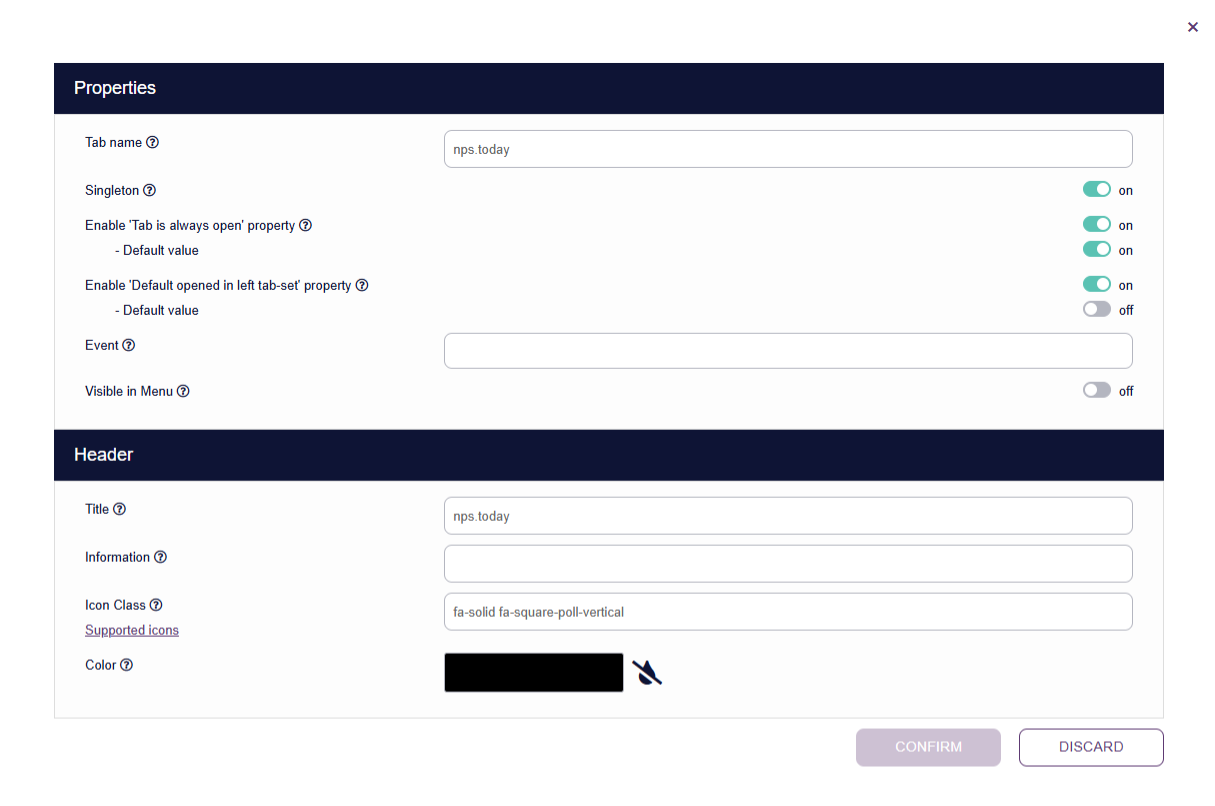
Default opened in left tab-set
We recommend having the nps.today tab popping up on the left side of the screen as a new call pops up on the right side. In this way, you make sure the agent does not miss any calls because of the widget blocking the call tab.
-
Click Save
-
Navigate back to Tab Configuration
- If the entire company should use the widget
- Click ☑️ at "nps.today" under Company/Inherit
- Set the value to on
- If only a user group should use the widget
- Click ☑️ at "nps.today" under Selected User Group/Inherit
- Set the value to on
- If only a user should use the widget (e.g. for testing)
- Select the User Group the user is in
- Click ☑️ at "nps.today" under Selected User/Inherit
- Set the value to on
- If the entire company should use the widget
-
Navigate to Widget Administration and find your nps.today widget
- Make sure that
canGetAccessTokenhas a ☑️ in the Default Value and a ☑️ in Possible to set option from widget
- Click Update
- Make sure that
-
The widget should now pop up next time an agent logs in at agent.puzzel.com. 🎉
Hide the widget
If you don't want to show the widget, you can hide it. In the admin portal, do the following:
- Go to Widget Administration.
- In the nps.today widget, click Add widget property.
- Call it
hideWidgetwith type "Boolean". We recommend setting it to false as default, so it isn't turned on when you click Add widget property. - Once the property is added, go to Widget Configuration and find the nps.today widget.
- Here you have the option to hide the widget. Set it at the appropriate level, for example by Company.

Surveys after chats
To survey customers after a Puzzel chat, see Integrated Chat Surveys, which we recommend. If you still use the old Puzzel chat, the widget can send the survey by SMS, see Surveys after chats in the old Puzzel chat.
FAQ
Settings have not applied
Be sure to reload the Puzzel pages when making a change on app.nps.today. This is due to the settings getting synced when reloading the page.