Request NPS Ratings (deprecated)
This action is deprecated
Request NPS Ratings still works, and flows and processes that use it keep running, so you don't need to change them. For new automations, use Send Surveys (nps.today), which sends to one record or to a whole list in one call.
This page is for you if:
- Send Surveys (nps.today) is not in your list of actions, because your nps.today package is older than the version that added it, or
- you have flows or processes that already use Request NPS Ratings and you want to keep them as they are.
With the latest version of the nps.today package, Flow Builder shows the action as Request NPS Ratings (Deprecated).
Inputs
| Input | Description |
|---|---|
| Campaign Id | The ID of the campaign you need to find in nps.today. |
| Respondent Id | The Respondent, that need to receive the NPS survey |
| What-Id | The ID of the record you need to refer to, e.g. the Case Id when an NPS is sent after a case is closed |
| Responsible | The Responsible of the customer receiving the NPS Survey, e.g. the Case Owner when an NPS is sent after a case is closed. In other situations, in could be the contact owner or the owner of the Account the Contact is related to. |
| Sender | The Salesforce user the survey is sent on behalf of, e.g. the record owner or the customer's CSM. Must be a user record ID, and the user must have an email address. See Send the survey on behalf of a Salesforce user. |
| Custom JSON | Here you can use JSON coding to ad any kind of Salesforce data in the nps.today custom field. This field accepts any valid json. We do not perform any actions on this information other than storing it and returning it to you on request. Limited to 8kb or nvarchar(4000) |
| AgentRating | The rating your employee gave in a P-GAP period, as a whole number. |
Stay within Salesforce's limits
Salesforce limits what a flow may do in one go, called a transaction: at most 100 queries and 50 background jobs. One call of Request NPS Ratings costs three queries and one background job for each campaign, whether the call carries one respondent or 200. So what matters is how many calls a transaction makes:
- Let Salesforce do the batching. In a record-triggered flow and in a scheduled flow, Salesforce collects up to 200 records and calls the action once for all of them. When we saved 600 records at once, the action was called three times. Calls for records that are saved together add up in one transaction when the action runs as part of the save, as it does in a process and on the Run Immediately path of a flow. One transaction allows 33 calls, i.e. 6,600 records saved in one go.
- Don't call it inside a loop. A loop calls the action once per record in the same transaction, and the 34th call fails, see Don't call it inside a loop.
- Send a list that a user picks with Send Surveys (nps.today). Request NPS Ratings takes one respondent per call, so a screen flow can only loop over the list. The new action takes the whole list in one call, see Move to Send Surveys (nps.today).
- Look for failed jobs. A request that fails shows as a failed job under Apex Jobs in Setup. It is not logged as an NPS Error record.
The numbers behind this:
| Value | Where it comes from | |
|---|---|---|
| Queries per call | 3 | Measured |
| Background jobs per call | 1 for each campaign | Measured |
| Calls in one transaction, e.g. in a loop | 33 | Measured, against Salesforce's 100 queries |
| Records per call in a record-triggered or scheduled flow | 200 | Salesforce's batch size, measured |
| Respondents per request to nps.today | All respondents of one call for a campaign. The action doesn't split a request. | From the action |
| In a loop with Always start a new transaction | 1,000 campaign members in about 12 minutes, 5,000 in 79 minutes | Measured |
| Scheduled flow interviews per 24 hours | 250,000, or 200 × user licenses | Salesforce's limit |
| Background jobs per 24 hours | 250,000, or 200 × user licenses, shared with all other background Apex in your org | Salesforce's limit |
We measured in a Salesforce scratch org in November 2026. Salesforce's own limits can change, see Execution Governors and Limits.
Don't call it inside a loop
Each call of Request NPS Ratings runs its own queries. A flow that calls it once per record, inside a Loop element, hits Salesforce's limit of 100 queries per transaction: the 34th call fails with Too many SOQL queries: 101, or an earlier one when the flow runs other queries in the same transaction. Earlier versions of Send surveys with a Screen Flow were built that way.
The lasting fix is to rebuild the flow with one call to Send Surveys (nps.today), see Move to Send Surveys (nps.today).
Until you rebuild the flow, you can keep it working: open the action in the loop, click Show advanced options and set Transaction Control to Always start a new transaction. Each record is then sent in a transaction of its own, so the query limit no longer stops the flow. It is slow, and a screen flow waits until the last record is done: in our test, 1,000 campaign members took about 12 minutes and 5,000 took 79 minutes. A failed request only shows as a failed job in Apex Jobs.
Example in a flow
To be performed by a Salesforce admin with some Salesforce experience.
This example sends an NPS survey when a case is closed. In Setup, go to Flows, click New Flow and choose Record-Triggered Flow.
-
Set the object to Case and run the flow when A record is updated. Add the condition Closed (
IsClosed) equals True, and choose Only when a record is updated to meet the condition requirements, so a case is surveyed once.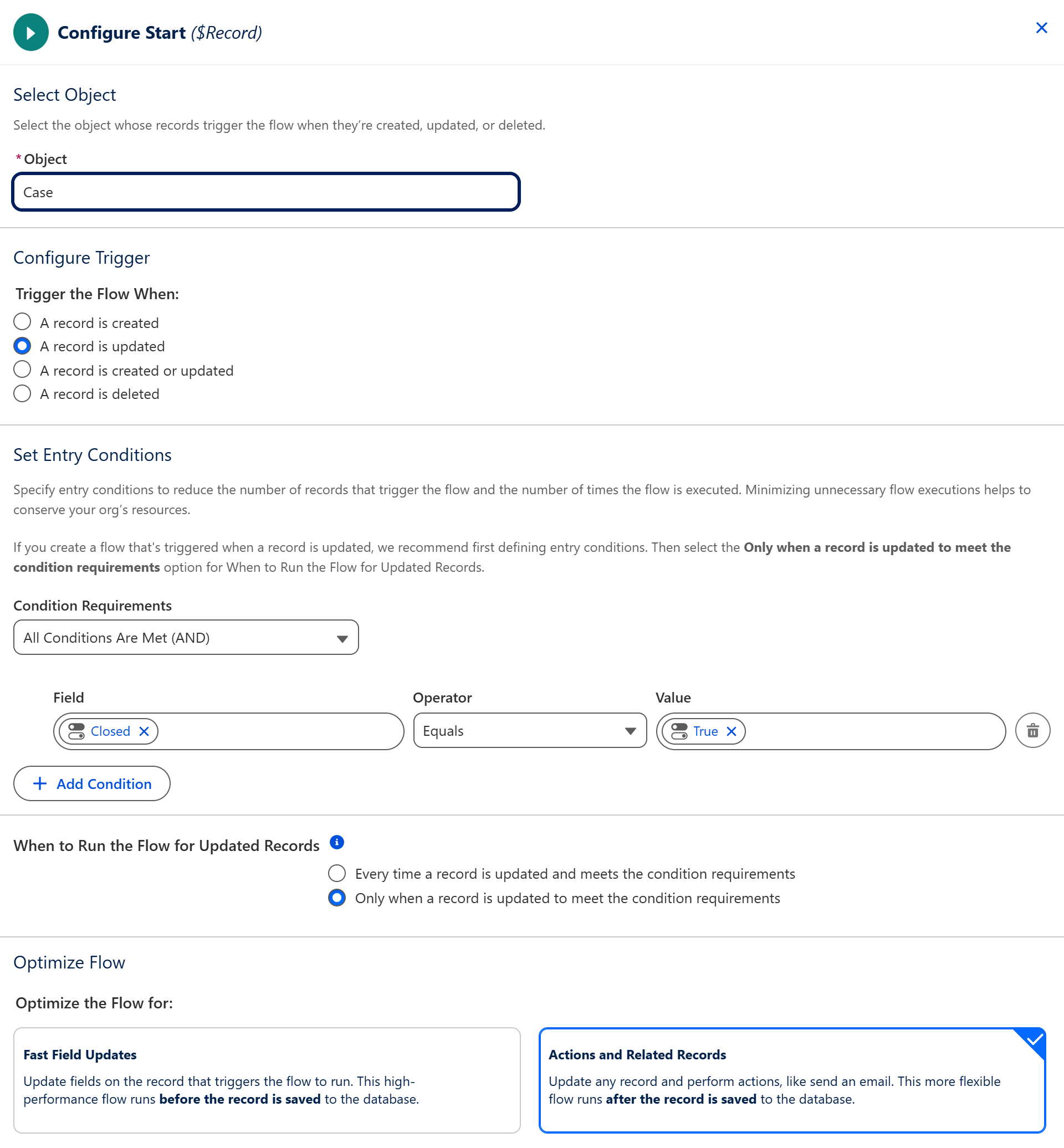
In Process Builder this condition was the criteria diamond, e.g. Case Closed. A flow keeps it in the Start element, where the canvas shows it as Conditions: 1. Click Edit on the Start element to see or change it.
-
Add an Action element, search for Request NPS Ratings and set its inputs as in the picture: the campaign ID, the contact of the case as the respondent, the case as the What-Id, the owner of the case as the responsible, and a formula as the Custom JSON.
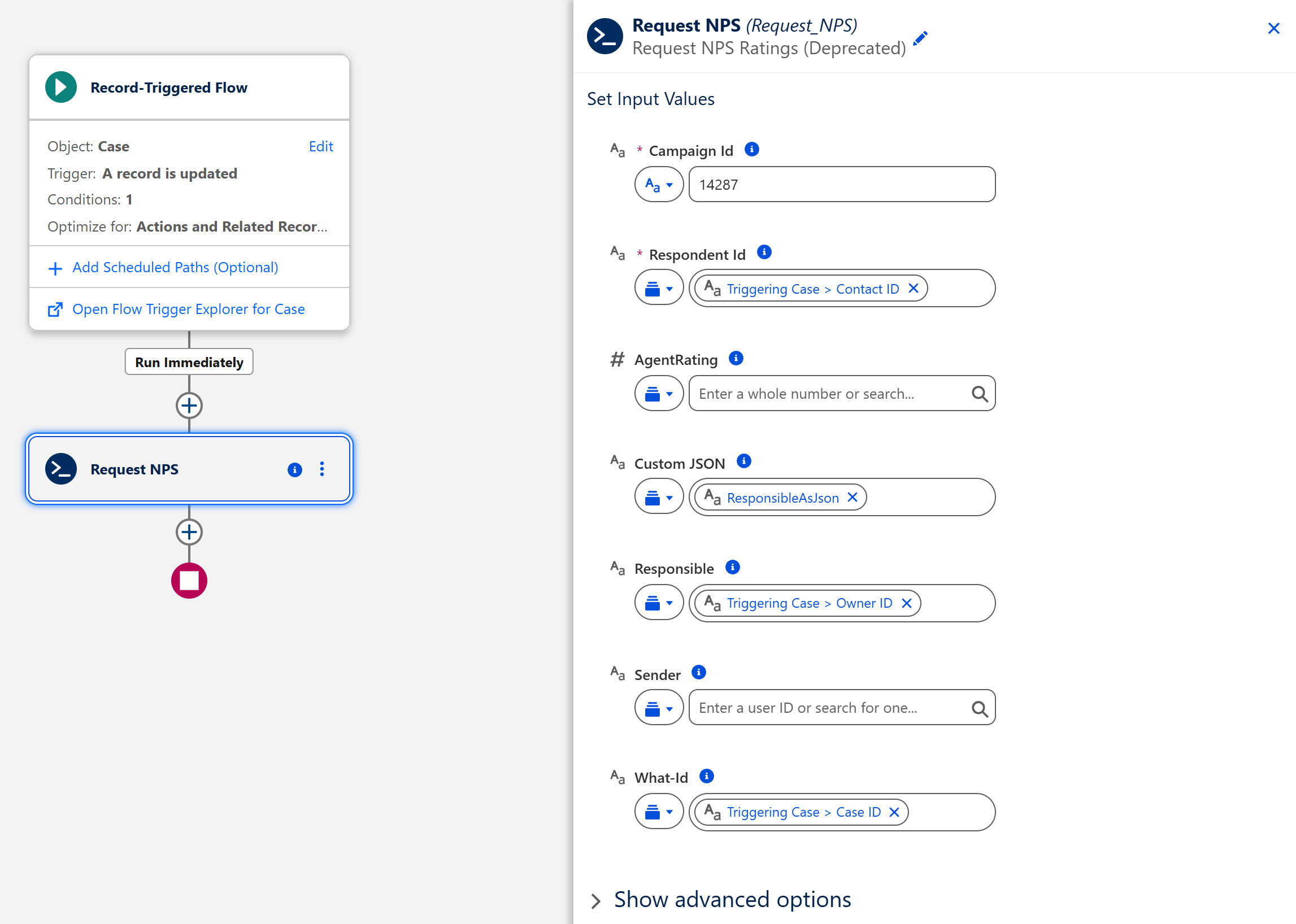
The inputs are described under Inputs above, and the formula behind Custom JSON under Add custom data. Campaign Id can take a formula resource too, e.g. to choose the campaign by the customer's country: the flow formula in Choose the campaign by country works for this action as well.
Note
Do you still have a process that was built in Process Builder? It keeps running. Salesforce ended its support for Process Builder on 31 December 2025 and recommends Flow Builder instead. Process Builder shows some of the inputs under an older name, e.g. NPS Campaign Id. For a complete example in Process Builder, which surveys the members of a Salesforce Campaign, see Trigger a survey to a list of contacts in Salesforce.
Send the survey on behalf of a Salesforce user
Use the Sender input to send surveys on behalf of an employee, such as the record owner or the customer's CSM, instead of creating a campaign per employee. Set it to a Salesforce user record ID, e.g. {!$Record.OwnerId} or the user lookup field that holds the CSM. Leave it empty to keep using the sender that is set on the campaign in nps.today.
nps.today uses the user's email, phone, first name and last name as the survey sender, and stores the Salesforce user ID as the employee's external ID. If nps.today has no employee with that email yet, one is created.
Rules for the sender
- The user must have an email address, because the survey is sent from it. If the sender is not a user (e.g. a queue that owns the record), cannot be found, or has no email address, that rating request is not sent and the reason is logged as an NPS Error record in Salesforce.
- If the campaign's sender has Always use this sender ticked in nps.today, the campaign's sender is used and the Sender input is ignored.
Update the nps.today package to the latest version to get the Sender input.
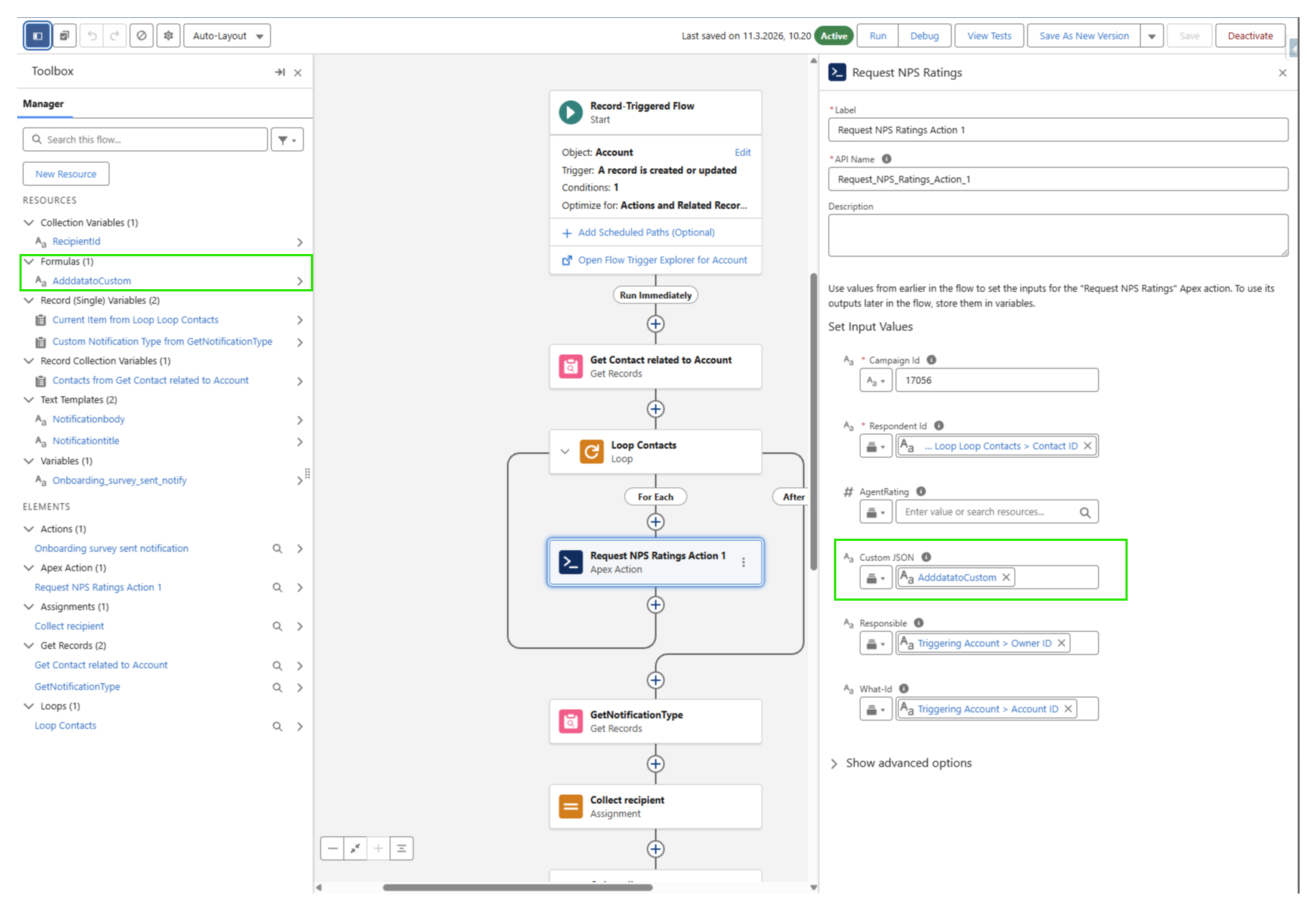
Add custom data
Build the JSON text with a formula resource, as in Data from other records. Then click the action on the canvas, select the formula in the Custom JSON input, click Save As New Version and then Activate.
Move to Send Surveys (nps.today)
Send Surveys (nps.today) takes the same information. To move a flow, add the new action, set it up from the table below and delete the old action.
| In Request NPS Ratings | In Send Surveys (nps.today) |
|---|---|
| Respondent Id | Send to and Records. Choose One record and the same resource, or give the action a whole record collection instead of calling it once per record. |
| Campaign Id | Campaign ID: Fixed value, or From the flow for a resource. |
| Responsible | Responsible employee: User ID from the flow for the same resource, or A user field on each record. |
| Sender | Sender, in the same way. |
| What-Id | What-Id: From the flow for the same resource. |
| Custom JSON | Fixed fields: JSON from the flow for a formula. It must be a JSON object, e.g. {"source": "Q4 survey"}. Without a formula, fields of the contact, lead or person account can be picked under Custom data, and values that are the same for every survey can be typed there as a key and a value. |
| AgentRating | Agent rating, shown with One record. |
- Send Surveys (nps.today) also returns Success and Message, which a screen flow can show.
- The lists for From the flow hold what Flow Builder's own list offers for this action, e.g. the running user, the prior values of the triggering record and what a component on a screen gives. Anything else can be typed under Other resource….
- In a flow that loops over records, replace the loop and its action with one call that gets the whole collection. Send surveys with a Screen Flow shows how.
- All settings are described in Send surveys from a flow.